

I hire more than 250 people a year, which makes me the person who pays for a development platform when it fails.
You have been asked to shortlist one. Every result on page one is a vendor ranking itself first, quoting star ratings with no review counts and pricing as “contact us”. So you shortlist from rewritten marketing copy, sit three demos that look identical, and sign three years on a category you cannot name.
You are not choosing a platform. You are choosing which of five categories your problem lives in, and eleven of these twelve will be wrong for you.
1 in 4
American employees say they lack opportunities for career advancement. Only 45% received training to develop new skills in the past 12 months, and just 28% took part in a mentorship programme.
Source: Gallup, American Job Quality Study, October 2025 (n = 15,968 U.S. employees)
Here’s what this guide contains:
- Twelve platforms with G2 and Capterra ratings, review counts attached, and the retrieval date visible
- Real starting prices where they exist, and an honest blank where they do not
- One named limitation per platform, attributed to a reviewer rather than asserted
- The five categories buyers confuse, and which platforms sit inside each one
- A three-year cost model covering the seven lines that never appear on the quote
- A seven-step evaluation blueprint, and fourteen questions to put to a vendor
The 12 Best Employee Development Softwares, compared (2026)
| Platform | Category | Best for | Starting price | G2 (reviews) | Capterra (reviews) |
|---|---|---|---|---|---|
| Lattice | Performance + dev planning | Development tied to performance cycles | From $10/user/mo | 4.7 (3,937) | 4.49 (205) |
| 360Learning | Collaborative LMS/LXP | Internal experts author the content | $8/user/mo (to 100) | 4.6 (580) | 4.7 (504) |
| TalentLMS | SMB LMS | Live in weeks, flat pricing | $149/mo flat (to 100) | Not verified | 4.7 (596) |
| Leapsome | Modular performance + learning | Full feature set, mid-market | Contact vendor | Not verified | 4.60 (97) |
| Culture Amp | Engagement + development | Engagement-led development | Contact vendor | Not verified | 4.62 (163) |
| Docebo | Mid/enterprise LMS + LXP | Employees, customers, and partners | Contact vendor | 4.3 (744) | 4.4 (236) |
| Degreed | LXP / skills-first | Large existing content estate | Contact vendor | 4.3 (42) | Not verified |
| Cornerstone Learning | Enterprise LMS + suite | Regulated, multi-country | Contact vendor | 4.1 (530) | 4.3 (232) |
| Fuel50 | Talent marketplace | Internal mobility is the problem | Contact vendor | 4.4 (25) | Not verified |
| TalentGuard | Competency + career pathing | Competency frameworks and IDPs | Contact vendor | 4.6 (only 4) | Not verified |
| BetterUp | Coaching | Leadership and high-potential | Contact vendor | 4.5 (18) | Not verified |
| Workday Learning | HCM suite module | You already own Workday | Module pricing | 4.1 (1,566)* | 4.46 (1,759)* |
Ratings and pricing retrieved 31 July 2026 from G2 and Capterra product pages and official vendor pricing pages. Re-checked quarterly. Fields marked “not verified” are left blank on purpose rather than filled with a plausible number.
The three-line size rule:
- Under 250 employees: you probably do not need this yet. Run a shared plan template on a quarterly cadence and buy when manual tracking breaks.
- 250 to 2,000: buy the development-planning layer, not an LMS and not a skills platform.
- 2,000 and above: inventory what you already own before evaluating anything, because you almost certainly hold three overlapping systems.
Here’s how the shortlist was built:
We did not pick these. We tallied which platforms appear across the four listicles currently ranking top-12 for this keyword set, then filtered for presence in a relevant G2 or Capterra category and for coverage across all five categories below, so the list helps a buyer rather than just runs long.
Here is what we cut, and why. Certifier, Kajabi, Livestorm, Unrubble, Calamari, and HR Partner are credentialing, webinar, and time-tracking tools inserted by the publishers who own them. ProProfs and PeopleGoal are self-placement by the number one result, Coursera, Udemy, and LinkedIn Learning are content libraries rather than development platforms, and Workhuman is recognition software.
1. Cornerstone Learning: Enterprise LMS with a Talent Suite
- Category: Enterprise LMS plus integrated talent suite
- Best for: Regulated, multi-country organisations needing compliance-grade audit trails alongside development
- Company size fit: Enterprise, 1,000+. Overkill below roughly 1,000
- Starting price: Custom, contact vendor
- Free trial: No public trial, demo only
- G2: 4.1 / 5 from 530 reviews (Corporate LMS), 30 June 2026
- Capterra: 4.3 / 5 from 232 reviews
This is the only platform here that can genuinely retire three systems at enterprise scale. Galaxy runs learning, performance, and compliance against one record, with AI skills inference layered on top. The vendor states 7,000+ organisations, 140 million users, and 186 countries.
The honest limitation: this is the lowest rating on the list, drawn from the second-largest review base, which makes 4.1 signal rather than noise. Reviewers cite administrative complexity consistently. One Capterra HRIS manager named legacy platforms like Cornerstone as what their organisation outgrew, then switched at licence expiry.
Sofia’s take: if your mandate is compliance, this is a strong answer. If your mandate is capability growth, you are buying a compliance engine and hoping development appears. Make them demo Galaxy’s skills inference on your own role data, not on theirs.
Sources: cornerstoneondemand.com · G2 Cornerstone Learning · Capterra Cornerstone LMS
2. Docebo: Multi-audience LMS with an LXP Layer
- Category: Mid-market to enterprise LMS with LXP capability
- Best for: Training three audiences at once, meaning employees, customers, and partners
- Company size fit: 45% enterprise, 29% midsize across the Capterra reviewer base
- Starting price: Custom, contact vendor
- Free trial: None, confirmed on Capterra
- G2: 4.3 / 5 from 744 reviews, the largest base of any dedicated LMS here
- Capterra: 4.4 / 5 from 236. Ease 4.3, Value 4.2, Support 4.2
Multi-audience delivery with a strong automation and API layer. Reviewers describe it as the step up organisations take once they outgrow a simpler LMS, and cleaner than the legacy enterprise platforms. More than 50 integrations, including Teams, Okta, SAP SuccessFactors, and Salesforce.
The honest limitation: cost escalation, not sticker price, is the recurring theme. A Capterra HRIS manager wrote that it “is expensive, can become complex to administer, and may require workarounds”, and that “costs can rise significantly as add-ons and advanced services are added”. Value for money at 4.2 is its weakest sub-score.
Sofia’s take: ask yourself whether you genuinely have three audiences. If you only train employees, you are paying for architecture you will never use. Demand the all-in year-one figure including implementation and every module you saw demoed, because several are priced separately.
Sources: docebo.com · G2 Docebo · Capterra Docebo
3. 360Learning: Collaborative Learning Built on Internal Experts
- Category: Collaborative learning platform, LMS plus LXP
- Best for: Organisations whose real expertise sits with internal subject-matter experts, not with L and D
- Company size fit: Spans all three, at 49% small, 27% mid, 24% enterprise
- Starting price: $8/user/mo (Team, to 100 users). Business tier: contact vendor
- Free trial: Yes
- G2: 4.6 / 5 from 580 reviews
- Capterra: 4.7 / 5 from 504. Ease 4.6, Value 4.3, Support 4.7, the highest support score here
Built on the premise that your experts create the content, not L and D, which attacks the content bottleneck that stalls most development programmes. The vendor states 2,500+ companies including Heineken, Michelin, and Cisco, with SAP Silver and Workday Design partnerships.
The honest limitation: technical glitches and variable support at peak are a consistent negative theme. More relevant to a development buyer, a French reviewer flagged that manager-side progress tracking “manque d’intuitivité” and takes several clicks to reach dashboards. Another named the real problem, which is getting colleagues to actually use it.
Sofia’s take: its core advantage assumes something most organisations lack, which is experts willing to author. Test that first. Ask three named engineers whether they would build a module, and if the answer is no, the differentiator evaporates and you are buying a mid-tier LMS.
Sources: 360learning.com · G2 360Learning · Capterra 360Learning
4. TalentLMS: Flat-Priced LMS for Smaller Teams
- Category: SMB-focused LMS
- Best for: Teams under 500 needing a working LMS live in weeks
- Company size fit: 73% small business, 18% mid, 9% enterprise, the clearest SMB skew here
- Starting price: $149/mo flat to 100 users, $299 to 500, $579 to 1,000. Flat-rate, not per-seat
- Free trial: Free version and free trial
- G2: Not verified. We are not publishing a figure we could not confirm
- Capterra: 4.7 / 5 from 596. Value 4.6, Support 4.5. On Capterra’s 2026 LMS Shortlist
The only platform here with genuinely public flat-rate pricing you can budget from without a sales call. For a first LMS purchase that is worth more than a feature you will never configure. The vendor states 70,000+ teams and 30+ integrations including BambooHR, Okta, and ADP.
The honest limitation: three complaints recur. Technical glitches, a restrictive editor (one customer education manager noted that pasting from other applications “produces really messy html”), and branch limits forcing tier upgrades, with a call-centre GM reporting an upgrade purely for branches. A banking L and D head flagged no in-platform AI course building.
Sofia’s take: right answer for a large share of readers, wrong answer for anyone whose mandate is capability growth. It is an LMS, cleanly and honestly, and it tracks completion. If you need role-to-skill mapping and development plans, this is not the category.
Sources: talentlms.com · Capterra TalentLMS
5. Degreed: Skills-First Learning Experience Platform
- Category: Learning Experience Platform, skills-first
- Best for: Large organisations sitting on significant content nobody can find
- Company size fit: Enterprise
- Starting price: Custom, contact vendor
- Free trial: Demo only
- G2: 4.3 / 5 from only 42 reviews (LXP), 17 July 2026
- Capterra: Not verified
The reference product in the LXP category. It aggregates learning and development across your ecosystem and organises it around skills rather than courses. Founded in 2012 and based in Pleasanton, California, with the vendor stating 9 million+ learners across hundreds of global companies.
The honest limitation: 42 G2 reviews against 9 million claimed learners is a gap worth raising in the demo, and it means the 4.3 carries far less weight than the same score on a heavily reviewed product. LXP value also tracks population autonomy, so in a shift-based workforce this produces analytics about nobody.
Sofia’s take: ask the question no LXP demo answers unprompted. Where does proficiency data come from? If the answer is employees rating themselves out of five, you are buying a confidence survey with an excellent interface.
Sources: degreed.com · G2 Degreed
6. Fuel50: Talent Marketplace for Internal Mobility
- Category: Talent marketplace, career pathing, internal mobility
- Best for: Organisations whose real problem is internal mobility, not training delivery
- Company size fit: Mid-market to enterprise
- Starting price: Custom, contact vendor
- Free trial: Demo only
- G2: 4.4 / 5 from 25 reviews (Talent Marketplace Platforms), 30 June 2026. Directional only
- Capterra: Not verified
Internal mobility as the organising principle rather than an afterthought. G2 reviewers specifically credit it with driving meaningful career conversations and converting insight into actionable growth plans. The vendor calls its skills ontology expert-driven, which you should record as a vendor claim, because that is what it is.
The honest limitation: 25 reviews is thin for a decision this size. And there is a dependency no platform fixes. A talent marketplace only works if managers release people. Without that, it surfaces internal opportunities employees cannot take, which is worse than surfacing nothing.
Sofia’s take: this is the closest platform on the list to the Lab’s own thesis, which is development data as a sourcing channel. Ask them directly how their customers handle managers who block internal moves. If they have no answer, the product cannot deliver its own promise.
Sources: fuel50.com · G2 Fuel50
7. TalentGuard: Competency Frameworks and Career Pathing
- Category: Competency management, career pathing, individual development plans
- Best for: Organisations needing a competency framework with IDPs tied to career paths
- Company size fit: Mid-market to enterprise
- Starting price: Custom, contact vendor
- Free trial: Demo only
- G2: 4.6 / 5 from 4 reviews. Four
- Capterra: Not verified
Real depth in exactly what the primary keyword describes: competency-based career pathing, succession, IDPs, and certification tracking in one place. An IT consultancy reviewer called it “the glue that holds our Career Development Model together”, and credited it with removing subjectivity from progression.
The honest limitation: named by reviewers themselves. Expensive, integration issues, difficult customisation, and UI work needed, with that last one flagged across reviews from 2017 to 2024, which suggests persistence rather than a phase. On a four-review base, this is a reference-check-hard platform.
Sofia’s take: best category fit on the list, thinnest evidence base on the list, and a buyer needs both facts in the same breath. Demand three references at your headcount and in your industry. Then ask the 2021 reviewer’s question: are we arriving too early in this product’s evolution for our model?
Sources: talentguard.com · G2 TalentGuard
8. Lattice: Performance Platform with Development Planning
- Category: Performance management with employee development planning (Lattice Grow)
- Best for: Development plans attached to performance and goal cycles rather than sitting apart from them
- Company size fit: Mid-market. HR leaders, people ops, CPOs
- Starting price: From $10/user/mo per Capterra. Competitors cite $11/seat, so verify at the vendor page
- Free trial: Free version and free trial
- G2: 4.7 / 5 from 3,937 reviews, by far the largest base here and the most statistically trustworthy score on this page
- Capterra: 4.49 / 5 from 205. Ease 4.5, Functionality 4.3, Value 4.4, Support 4.5
Development lives where performance conversations already happen. Reviewers credit it with bringing structure to goals, feedback, and reviews, and with making 1:1s and career planning a habit rather than an annual event. Capterra lists Individual Development Plans among its top-rated features.
The honest limitation: reviewers are specific. Reporting drill-downs are thin for smaller companies, the HRIS dependency is real (an HR manager noted they “can not make changes in Lattice that are not in the HRIS”), navigation gets clunky across layers, and a lead HR talent consultant said flatly that it “doesn’t feel like there’s a lot of innovation behind it”.
Sofia’s take: strongest evidence base here, and a category fit that matches the keyword. The honest caveat is that Lattice is a performance platform that does development, not a development platform. Right for most mid-market buyers, wrong if you need a real skills ontology.
Sources: lattice.com · G2 Lattice · Capterra Lattice
9. Leapsome: Modular Performance, Learning, and Engagement
- Category: Performance, learning, and engagement, sold modularly
- Best for: European and mid-market teams wanting development, performance, and engagement in one modular stack
- Company size fit: Mid-market. Reviewers say it can overwhelm smaller companies
- Starting price: Capterra lists contact vendor. Competitors cite roughly $8/user/mo, so verify. Pricing is modular, which matters
- Free trial: Free version and free trial
- G2: Not verified at product level. A seller page shows 4.8 from 2,428 but aggregates multiple products, so we are not publishing it as the platform rating
- Capterra: 4.60 / 5 from 97. Ease 4.6, Functionality 4.4, Value 4.5, Support 4.6
The best feature-per-pound case here. Capterra scores it 38 of 38 top features, the only platform on this list to cover the full set including IDPs. An IT manager credited it with enabling L and D strategy “very effectively, with the individual development plans”, and a COO reported “little to no resistance” on rollout.
The honest limitation: two things a development buyer must know. A CFO reported that “paying per module vs. all-access becomes expensive quickly” at 40+ employees. And an operations reviewer stated plainly that “the learning module leaves a lot to be desired”, which is material if learning delivery is your primary need.
Sofia’s take: scope your modules to the ninety-day use case, then price the all-access tier before committing, because the per-module maths turns against you fast. If learning delivery is the core requirement, pair it with something else or look elsewhere.
Sources: leapsome.com · Capterra Leapsome
10. Culture Amp: Engagement Platform with a Development Module
- Category: Employee engagement platform with a development module (Develop, Skills Coach)
- Best for: Engagement is the driver and development the connected second act
- Company size fit: Mid-market to enterprise
- Starting price: Custom, contact vendor, confirmed on Capterra
- Free trial: Free version and free trial
- G2: Not verified. Competitors cite 4.5, which we are not publishing unconfirmed
- Capterra: 4.62 / 5 from 163. 94% rate it above 4 stars
Behaviour change rather than content delivery. Skills Coach runs short habit-forming exercises, and the development module sits on the strongest engagement dataset here, so development priorities can be set from real engagement signals instead of guesses.
The honest limitation: it is an engagement platform first. Measured against role-requirement capability growth, Develop complements the engagement core rather than replacing a development-planning or skills platform. Capterra reviewers also raise integration friction and UX concerns.
Sofia’s take: here is the line competitors miss. If you already own Culture Amp, switching on Develop costs a fraction of a standalone platform with no integration project. That arithmetic beats a feature matrix more often than buyers expect.
Sources: cultureamp.com · Capterra Culture Amp
11. BetterUp: Human Coaching at Scale
- Category: Coaching and mentoring platform
- Best for: Leadership and high-potential development where the constraint is guidance, not content
- Company size fit: Mid-market to enterprise. The G2 base skews small and mid-market
- Starting price: Custom, contact vendor
- Free trial: None, named as a dislike by a reviewer
- G2: 4.5 / 5 from 18 reviews (Mentoring Software), 17 July 2026
- Capterra: Not verified
Human coaching at a scale you cannot staff internally, with a measurement layer on top. Reviewers credit the Whole Person Model, and the ability to switch coaches until the match is right.
The honest limitation: cost dominates the complaints and is unambiguous. Reviewers call it “pricier” and “way too much”, and one non-US reviewer found local face-to-face coaching at roughly 30% of the price. Coach selection is algorithmic with limited browsing. For comparison, GrowthSpace carries 4.8 from 246 reviews, a far stronger evidence base than 18.
Sofia’s take: coaching is the highest-impact and least scalable intervention in development. Treat this as targeted spend for a defined population, not as a platform decision. And with 18 reviews, reference checks matter more than the rating does.
Sources: betterup.com · G2 BetterUp · G2 GrowthSpace
12. Workday Learning: The Module Inside your HCM
- Category: Learning module inside an HCM suite
- Best for: You already run Workday HCM and should switch this on before evaluating anything else
- Company size fit: Enterprise
- Starting price: Module pricing on the existing HCM contract
- Free trial: Not applicable, existing-customer module
- G2: Workday HCM, the parent, at 4.1 / 5 from 1,566 reviews. No module-level rating is published
- Capterra: Workday HCM at 4.46 / 5 from 1,759 reviews
Zero integration project, and one employee record. Learning data sits natively beside performance, compensation, and succession, which makes workforce-planning questions answerable in a way a bolted-on platform never quite manages.
The honest limitation: suite modules are typically the third-best product in every category they cover. Workday HCM reviewers broadly cite complexity and configuration effort, and switching cost once configured is close to prohibitive, which cuts both ways.
Sofia’s take: this entry is what makes the list credible, because recommending it costs us traffic. If you own Workday, switch on the module and run it two quarters before evaluating a single vendor above it. Seventy percent capability with no integration project beats best-in-class nine months late.
Sources: workday.com · G2 Workday HCM · Capterra Workday HCM
How to Read Those Ratings (a 4.6 from four reviews is not a 4.6)
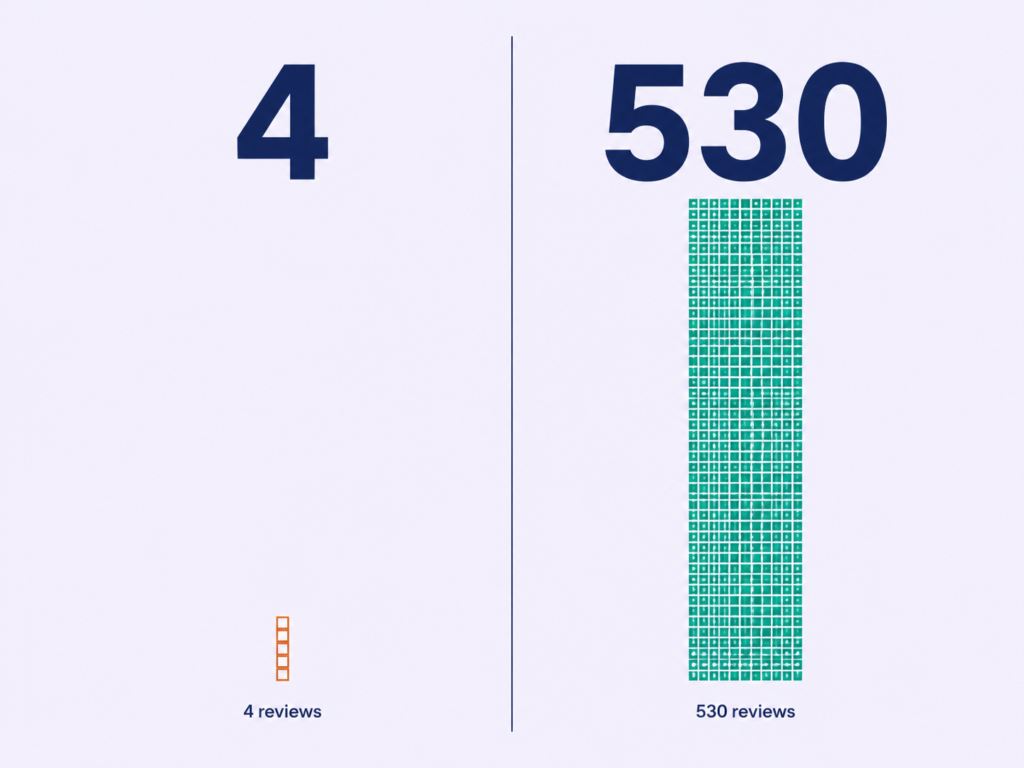
Look at our own table. TalentGuard shows 4.6 out of 5 on G2 from four reviews. Cornerstone shows 4.1 from 530.
Side by side with no review counts, which is exactly how every competitor ranking for this keyword presents them, TalentGuard looks like the better product. It is not a comparison. It is two numbers that happen to share a scale.
Four reviews and 530 reviews are not the same evidence. A rating without its denominator is decoration.
⚠ WATCH OUT
Red flag: any comparison table that prints star ratings without review counts. The omission is the point. It makes thin evidence and heavy evidence look identical on the same row, and it is the single most common trick in this SERP.
Here’s the difference:
- Never accept a rating without its n. Under roughly 50 reviews, treat the score as directional only.
- Check the date range. TalentGuard’s four reviews span 2017 to 2024, so the UI complaint may or may not still be live.
- Read the one- and three-star reviews first, and read the “what do you dislike” field rather than the summary.
- Filter to your own company size. A platform loved at 50 employees tells you nothing at 5,000.
The old way
- Sort the shortlist by star rating
- Read the five-star summaries
- Treat a “Best of” badge as evidence
The Lab Way
- Sort by review volume within category
- Read the dislikes field first
- Filter every score to your headcount band
I apply the same rule to my own numbers. I report Yield Ratios and Quality of Hire with the denominator attached, because a conversion rate without one is a decoration, and that is exactly why we report Yield Ratios with denominators even when the raw percentage would read better without them.
One distinction worth naming precisely. G2 and Capterra publish their review counts honestly, and both disclose that vendors pay for profiles and that referral fees exist. That does not invalidate the reviews. It does mean a “Best of” badge is marketing, not evidence, and it is the listicles rather than the review sites that hide the counts.
What we verified, what we could not, and the link policy
Every rating on this page came from a G2 or Capterra product page, retrieved 31 July 2026. Pricing came from official vendor pricing pages first, and from a verified listing where a vendor page could not be retrieved. Where those two disagree, we say so rather than quietly picking one.
Two live examples. Capterra lists Lattice from $10 per user per month while competing articles cite $11 per seat, and Capterra lists Leapsome as contact vendor while competitors quote roughly $8. Both discrepancies are printed above rather than resolved silently.
Seven fields across the twelve profiles read “not verified” instead of carrying a plausible number. That is the correct choice. A number you cannot source is worse than a gap, because a gap tells you what to check and a fabricated figure tells you nothing at all.
This list is not exhaustive. It is the twelve platforms a buyer is most likely to encounter, sourced and dated.
What Employee Development Software is, and The Five Categories Buyers Confuse
Employee development software plans, delivers, and measures individual capability growth against role requirements. It holds development plans, skills data, learning content, coaching, and internal career paths in one place, and it exists to answer whether a named person is becoming ready for a named role.
Here’s the difference:
Development software answers whether someone is becoming ready for a role. Training software answers whether they completed a course. That single distinction decides which of the five categories below you are actually buying, and it is the distinction every ranking competitor collapses.
What it is not: an LMS, your HRIS talent module, a performance review tool, or a content library.
I am the internal customer of this decision. At 250+ hires a year, when development software works, my requisition count drops, which is also why I care how we map skills before a requisition exists rather than after one opens.
Category 1: Learning Management System (LMS)

The system of record for structured, assigned, trackable training. It is good at compliance, certification expiry, audit trails, and mandatory onboarding.
The buying signal:
You have a legal obligation to prove a named person completed a named course on a named date, and you need compliance training that survives an audit.
The failure mode:
Buying an LMS to solve a motivation problem. It is excellent at proving compliance and structurally incapable of creating curiosity. My verdict on skills assessment tools applies here unchanged: strong signal when used correctly, damaging when misaligned, and the tool is rarely what is wrong. The mandate is.
On this list: TalentLMS, Cornerstone, Docebo. Ask about SCORM and xAPI support for one reason only, which is content portability at exit. That is a negotiation lever, not a feature.
Category 2: Learning Experience Platform (LXP)
A discovery layer that recommends content the employee did not know to look for. It is good at serving self-directed professional populations, surfacing internal expertise, and keeping a content investment visible.
The buying signal:
You already own significant content and nobody can find it.
◆ PRO TIP
The catch: LXP value is a function of population autonomy, not platform quality. It works for engineers and product teams. In shift-based frontline populations it produces beautiful analytics about nobody, and no amount of recommendation tuning fixes that.
I hold the same position on sourcing that I hold here: more applications never meant better hiring, and the right five candidates beat 500 wrong ones. More courses does not mean more capability, for the identical reason, which is why volume metrics mislead in talent work. On this list: Degreed, Docebo, 360Learning.
Category 3: Development Planning Software
This is the category the primary keyword actually describes, and the one the search results conflate worst. It is where an individual development plan is created, tied to role competencies, reviewed on a cadence, and kept visible to both manager and employee.
The buying signal:
Your development plans currently live in a spreadsheet or an appraisal comment box.
The failure mode:
It becomes a compliance form with a nicer interface. That is what happens when the plan is not tied to a real internal opportunity, and it is the most common outcome in this category. A plan not connected to a real opening is a wish list.
◆ FROM THE LAB
The Sofia lens: earlier in my career I inherited a hiring function with two problems that nobody had connected. External hiring cost was climbing, and new joiners were taking more than two months to reach full productivity. Every proposal on the table was about sourcing harder.
We built a First Look policy instead. Every requisition sat internally for 48 hours before any external posting, and recruiters were told to proactively tap named internal candidates during that window rather than wait for applications. It was a small mechanical change with a deadline attached, which is why it survived.
That year, 23% of our hires were internal moves. Time-to-Productivity for those hires ran 28 days against 67 days for external hires, a ramp roughly 40 to 50% faster. The lesson transfers directly to this purchase. Your best candidates are sometimes already on the payroll, and a development plan is only worth licensing if it points at a role that genuinely exists.
The Lab Way here is a live plan tied to named internal openings, reviewed on a 90-day cadence, with manager completion tracked as a management metric. That works because of the 48-hour internal posting window sitting underneath it. On this list: Lattice, Leapsome, TalentGuard.
Category 4: Talent Management Suite
Development as a module inside a suite that also runs performance, compensation, and succession. It is good at giving you a single employee record, no integration project, and procurement simplicity.
The buying signal:
You already own the suite, and the incremental module cost is a fraction of a standalone platform.
The old way
- Pick best-in-class on the feature matrix
- Count features per vendor
- Treat integration as an IT problem for later
The Lab Way
- Score capability delivered per month of integration effort
- Price the module you already own first
- Take 70% capability live in six weeks over 100% live in nine months
The failure mode is real, though. Suite modules are usually third-best in every category they cover, and switching cost once configured is close to prohibitive. My verdict on enterprise ATS platforms is the direct precedent: powerful and customisable, but a platform rather than a plug-and-play tool, which makes it right for teams with admins and process maturity and wrong for lean teams without change discipline. Before you decide, understand what integration actually costs in HR tech. On this list: Workday Learning, Cornerstone, Culture Amp.
Category 5: Skills Intelligence Layer
The data layer that defines skills, maps them to roles and people, and infers proficiency from work signals. It is what makes every category above it functional, and it is the one most often sold on a screenshot.
The buying signal:
Someone has asked what capability you will be short of in eighteen months and you cannot answer.
An ontology populated by self-assessment is a confidence survey, not a capability map.
Three data sources produce a defensible ontology: verified assessment, work artefacts and output, and manager-validated project history. Anything else is opinion with a graph on top.
⚠ WATCH OUT
Red flag: a vendor who shows you a beautiful skills graph and cannot say where the proficiency data originated. Ask once. If the second answer is still about the model rather than the input, the graph is generated confidence.
◆ FROM THE LAB
My experience: at one point I needed a manufacturing systems analyst, a role that sits awkwardly between plant operations and software. Traditional sourcing, meaning title matching and resume keywords, returned 14 qualified resumes across several weeks. The market was not thin. Our filter was.
So we inverted the funnel and searched for evidence instead of credentials. PLC programming projects. Lean manufacturing case studies. Documented work rather than claimed capability. That search returned 62 candidates.
The person we hired was a former factory-floor supervisor who had taught himself Python on nights and weekends, and he now leads digital transformation work. He would not have passed a single resume screen. Credential gatekeeping eliminates your best candidates, and the same logic decides this purchase: signals beat self-description, externally and internally.
That approach has a name in the Lab, and it is worth reading in full on inverted sourcing funnels before you evaluate a skills platform. Becoming a skills-based organisation is not self-evidently good, either. It costs a named owner, a maintenance budget, and a refusal to decide on self-reported proficiency. On this list: Fuel50, Degreed, Cornerstone Galaxy.
The Adoption Problem Nobody Selling You Software will Mention

Logins peak in week one and drop 40 to 60% by week six. Industry-average platform adoption sits near 71%, so roughly three in ten paid licences are dormant, and completion rates sit in single digits.
Run that in your own numbers rather than mine. Two thousand seats at $9 per user per month is $216,000 a year, and 29% dormant is about $62,600 spent on people who never log in.
$62,600
Annual spend on dormant licences at 2,000 seats and industry-average adoption. Do this arithmetic with your own headcount and your own quoted rate before the second demo, not after the first renewal.
Here’s the deal:
Procurement evaluates the admin console, because that is what the demo shows. Your employee only ever sees the learner interface, and nobody in the buying committee has opened it.
⚠ WATCH OUT
Watch out: you buy the admin console, your employees get the learner interface. Those are two different products with one price, and only one of them determines whether the contract renews.
Here is what your workforce actually meets on day one:
- A separate login sitting outside your SSO
- No presence in Teams or Slack, where the work already happens
- Mobile as a responsive afterthought rather than a designed surface
- Mandatory content standing between them and anything relevant
The countermeasure is one line. Score the learner interface separately, on a real device, with five employees drawn from your least enthusiastic population, and weight that score equally with the committee’s.
The old way
- Measure the rollout by go-live date and licence count
- Let the buying committee score the demo
The Lab Way
- Measure week-twelve active use against a pre-launch baseline
- Run a shadow scorecard from the population you are most worried about
I could only ever claim a Time-to-Offer improvement from 68 days to 34 because somebody recorded the 68 first. If you cannot state the before number, you cannot claim the after, which is how we baseline before we change anything.
The Manager Bottleneck

Development software routes work to managers. Quarterly growth conversations, plan reviews, skills claim validation. Every one of those is a manager task wearing a software label.
Managers have no capacity for it. They spend nearly 40% of their time solving today’s problems and doing administrative work, with only 13% of their time spent developing the people who work for them.
Source: Deloitte, 2025 Global Human Capital Trends
Translation: any platform assuming managers will hold quarterly growth conversations, review plans, and validate skills claims is assuming capacity that measurably does not exist. Three countermeasures work.
- Reduce what the platform asks of a manager to a number of minutes you have actually measured, not estimated
- Make development-conversation completion a tracked management metric, carrying the same weight as their hiring or budget numbers
- Pre-populate everything possible, so the manager edits rather than authors
◆ PRO TIP
The honest downside: this is why most development platforms underperform, and it is not fixable by buying a better platform. I hold an unpopular position on the wider version of this, which is that retention problems are mostly systems failures rather than compensation failures. The systems failing here are weak manager capability and thin internal mobility, and that is why retention is a systems problem long before it is a pay problem.
What Employee Development Software Costs
Licence runs roughly $4 to $12 per user per month for an LMS, and roughly $6 to $18 for development planning or an LXP. Skills intelligence is usually a platform fee rather than a per-seat rate.
The table above agrees with that model. TalentLMS at $149 a month flat for 100 users, 360Learning at $8 per user per month, Lattice from $10. Those are the only three public numbers on the page, which tells you something about the category.
Here’s what’s not on the quote:
- Implementation and configuration, frequently 30 to 100% of first-year licence
- Content licensing, which renews separately and on its own clock
- Integration build and maintenance, including who owns it when the HRIS upgrades
- Internal admin FTE, which is always a fraction of a person, so name the fraction
- Change management and launch comms
- Manager time, the largest hidden cost: minutes times managers times quarters times loaded rate
- Exit and migration cost, which you will pay eventually and can only price now
13%
The share of a manager’s time currently spent developing their people. Price the minutes your platform adds against that number, because it is the line most business cases leave out entirely.
Model all seven as ranges relative to licence, never as absolutes. A model built on ratios survives any price point. A model built on one vendor’s quote dies the moment the quote changes.
I build cost cases this way because it worked on my own numbers. Cost per hire for senior engineering roles moved from ₹6.5 to 7.5 lakh down to ₹3 to 3.8 lakh, and Time-to-Fill from 70 to 80 days down to 45 to 50, which is roughly a 45 to 55% reduction. The transferable point is the method rather than the headline, and the full working sits in how we cut cost per hire by half.
The old way
- Build the case on licence cost
- Attach a benefits narrative
- Report cost per licensed seat
The Lab Way
- Model three-year cost across all seven lines
- Price manager time explicitly
- Set the benefit target against that total
The Three-Year Model, and The Case for Waiting
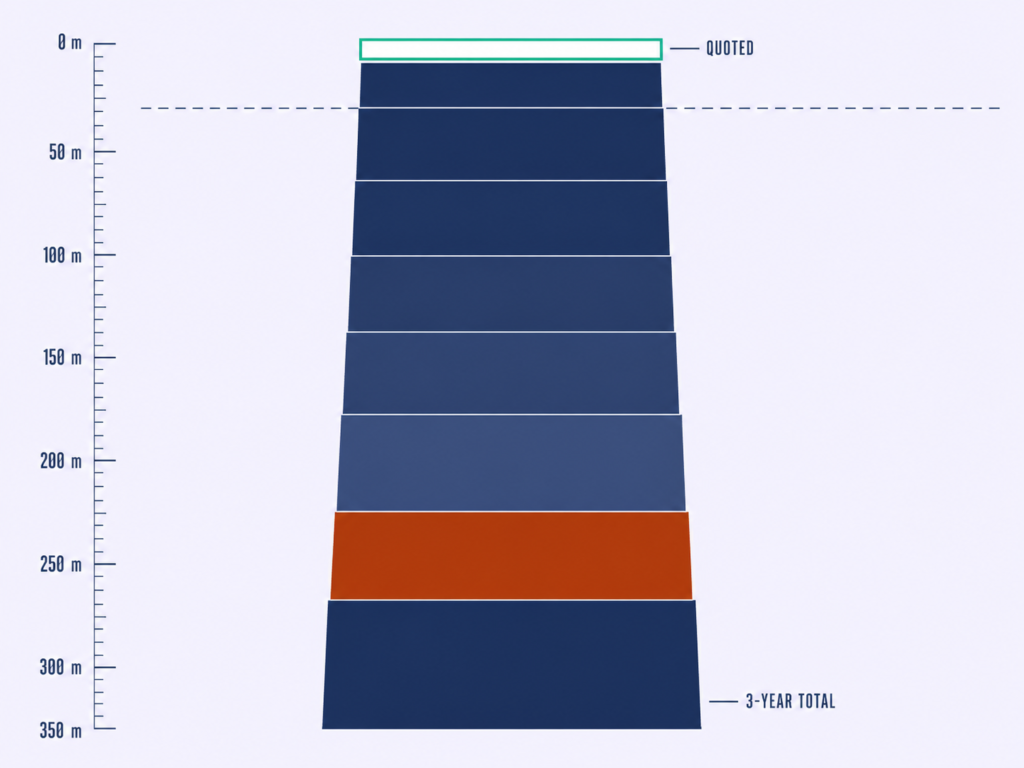
Build this table and fill it with your own figures. The formulas matter more than any number I could invent for you.
| Cost line | Year 1 | Year 2 | Year 3 | 3-year total |
|---|---|---|---|---|
| Platform licence | Quoted | + uplift % | + uplift % | Sum |
| Implementation and configuration | 30–100% of Y1 licence | 0 | 0 | Sum |
| Content licensing | Quoted separately | + uplift % | + uplift % | Sum |
| Integration build and maintenance | Build estimate | 15–25% of build | 15–25% of build | Sum |
| Internal admin FTE | Fraction × loaded salary | Same | Same | Sum |
| Change management and launch | One-off estimate | Refresh estimate | Refresh estimate | Sum |
| Manager time | Minutes × managers × 4 × rate | Same | Same | Sum |
| Exit and migration reserve | 0 | 0 | Estimate | Sum |
| Cost per ACTIVE user | Total ÷ active | Total ÷ active | Total ÷ active | The only per-seat number worth reporting upward |
Now the third option nobody selling you software will name. Not buying yet.
- You have no role-to-skill mapping and nobody owns building one
- Your managers currently hold no development conversations at all, so software will digitise a process that does not exist
- You cannot state your current internal mobility rate, so you will have no baseline to improve against
Any one of those three disqualifies the purchase this quarter. For organisations under a few hundred people, a structured template plus a disciplined quarterly cadence outperforms most platforms for eighteen months, because the constraint is manager behaviour rather than tooling.
None of that is scepticism about development itself. Gallup found only 45% of employees received training to develop new skills in the past 12 months and just 28% took part in mentorship, while 48% of those who did report high job satisfaction against 29% who did not. Translation: the investment thesis holds. The participation gap is the problem, and software does not close a participation gap on its own.
Source: Gallup, American Job Quality Study, 2025
◆ FROM THE LAB
Real implementation: I would not buy a sourcing platform before knowing which skills I was short of, which is the entire premise of Talent Market Pre-Alignment. Identify and engage capability ahead of demand, then let the tooling follow the shape of a process that already runs.
Apply the same discipline here. Run the programme manually for two quarters, learn what actually breaks, then buy the platform that fixes that specific thing. You will spend less and you will know what you are scoring in the demo, which is the whole argument for Talent Market Pre-Alignment as a buying discipline rather than a sourcing one.
How to Choose: The 7-step Evaluation Blueprint
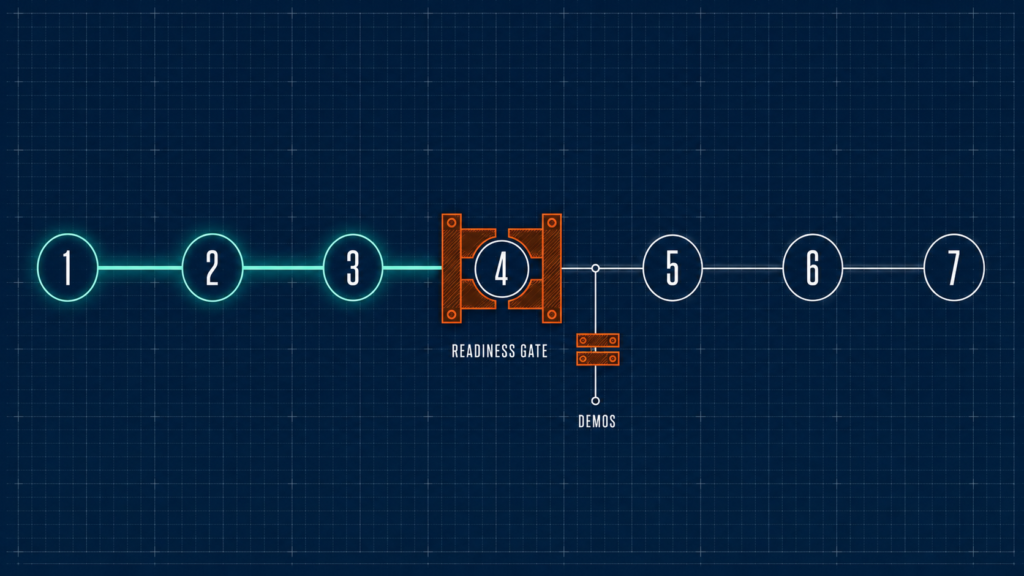
Every competing article has a “how to choose” section, and every one is four generic bullets. Here’s how to build it properly.
1
Step 1: Instrument the problem before you shortlist
Capture six baseline numbers before a single vendor call.
- Internal mobility rate, meaning internal moves as a share of roles filled, with “move” defined in writing
- Percentage of employees with a plan updated in the last 90 days
- Time-to-Productivity for internal versus external hires
- Voluntary attrition in the top performance quartile
- Capability coverage against critical roles
- Cost per active user, once you have one
Then set the reporting calendar: baseline pre-launch, report at week twelve, month six, and month eleven. Not month twelve. By month twelve the renewal conversation has already started without you.
Your renewal-defence one-pager is five blocks: the mandate quoted verbatim, baseline versus current with deltas, cost per active user against the licensed-seat equivalent, two named examples of internal moves traceable to the platform, and a one-line renew, renegotiate, or exit recommendation. Recommending exit is legitimate and career-safe when the one-pager supports it. These are the TA metrics we report upward, applied to a software decision.
◆ FROM THE LAB
The Sofia test: at one point in my career I was asked to scale an automation engineering team faster than the market would allow. The obvious move was to post harder. Instead we mapped competitor talent across twelve companies in the industrial IoT space, building a picture of who held the skills, where they sat, and what would move them.
By the time the job descriptions were written, we had 37 qualified candidates already identified. Time-to-Offer fell from 68 days to 34.
Here is the part that matters for your software purchase. That initiative is only defensible because somebody recorded 68 days first. Without the baseline it is a nice story with a number attached, and no CFO renews a contract on a nice story. Baseline first, then change something.
2
Step 2: Name the category, write the mandate
Force one written sentence before any demo is booked.
We are buying [category] to move [baseline metric] from [current] to [target] by [date], and the owner is [name].
That sentence does three mechanical things. It eliminates two of the five categories immediately, it prevents scope creep during the demo cycle, and it gives the committee a tie-breaker when two vendors score within a point of each other.
A good one reads: we are buying development planning software to move the share of employees with a plan updated in 90 days from 11% to 60% by Q2, and the owner is the Head of Talent. A bad one names a feature instead of an outcome: we are buying a platform with AI-powered skills mapping. If you cannot write the good version, go back to Step 1 rather than proceeding.
This is the same discipline as Intelligence-Led Sourcing: decide the architecture before you shop.
3
Step 3: Build the weighted requirements matrix
Your current matrix has 90 rows, everything marked essential, and no discriminating power. Convert it into a scoring instrument with three tiers.
| Tier | How it scores | What belongs here |
|---|---|---|
| Non-negotiables | Pass or fail gate, no score | SSO and directory sync; an editable skills model; role-to-skill mapping; plan objects with review cadence and ownership; manager views under ten minutes a quarter; exportable skills and plan history in a documented schema; native presence where work happens |
| Conditional capabilities | Weighted 1 to 5 | Only where you can name an owner and a ninety-day use case |
| Demo theatre | Weighted zero, but recorded | Anything the vendor leads with that fails the two tests above |
Two rules hold it together. Total weight is fixed before the first demo and cannot change after it, and the learner-interface score carries equal weight with the admin score. A healthy matrix is seven gates and eight to twelve weighted items. Nothing else.
⚠ WATCH OUT
Common mistake: accepting “reporting exports” as the export gate. Reporting exports are not your skills graph and plan history in a documented schema, and the difference between those two things is six figures at migration. Get the schema named in the contract.
The logic is the one behind inverted sourcing. Filter on capability signals, not on everything measurable, which is also the basis for scoring what actually predicts success in any selection process.
4
Step 4: Run the skills-data readiness check
This is the step most likely to change your decision. Four checks, each with a pass condition.
- Do you have a role architecture, or do you have a list of job titles?
- Do you have skill definitions at usable granularity, with a named owner?
- What is your actual proficiency data source, and is it self-assessment?
- Who maintains the taxonomy after go-live, in named FTE?
⚠ WATCH OUT
Watch out: if three of those four are weak, no platform in any category will produce a defensible skills view in year one. Buy the narrowest tool that fixes your worst baseline number and defer the skills-intelligence purchase entirely.
Budget two to four weeks for this exercise and plan around it. It is not quick, and the organisations that skip it are the ones that buy a skills platform with no skills data and end up with a beautiful, confidently wrong graph.
My own Quality of Hire progression makes the point. Competition analysis moved it 12%. A talent landscape study for similar industries moved it 14%. A skill-based talent pipeline built after proper market analysis moved it 30%. The 30% came from the analysis, not from a tool, and the maintenance burden is real, which is what a real skills taxonomy costs to maintain.
5
Step 5: Pilot with your hardest population
Standard pilots produce useless data. Run one with volunteers from your most engaged team and you have measured enthusiasm, not the platform.
Pick the population you are most worried about instead. Shift-based, field-based, or the team whose manager is least interested. Run ninety days, and define the pass condition before you start.
- Week-twelve active use above a stated threshold
- Manager review completion above a stated threshold
- A stated number of participants able to name something specific they can now do
◆ PRO TIP
The honest downside: this pilot will look worse than a volunteer pilot, and that is the point. The number you get from your hardest population is the number you will live with at scale. A failed pilot here is a saved contract.
◆ FROM THE LAB
My experience: I once owned a hiring programme with a target of roughly 350 to 500 people across customer support, operations analysts, junior engineers, and sales support, inside an 8 to 12 week window. Tight timelines, limited interviewer capacity, and a real risk of candidate drop-off at every stage.
We planned capacity backward from the business start date rather than forward from optimism. Weekly targets mapped in reverse, recruiter bandwidth and interviewer availability forecast against them, role clusters built to widen the pool without diluting the bar. Then standardised pre-assessment criteria, batch interviews with structured scorecards, daily recruiter stand-ups, weekly war-room calls with hiring managers, and a single point of contact per candidate batch.
We delivered 420+ hires in 10 weeks. Turnaround Time fell from 32 days to 18 to 20, offer-to-join held above 90%, 90-day retention landed at 85 to 88%, and recruiter productivity improved by roughly 35%. The parallel to pilot design is exact: we designed against the hardest constraint rather than the friendliest one, which is the only reason the numbers survived contact with reality. Here is how we planned capacity backward from the start date.
6
Step 6: Negotiate year three, not year one
You will win a year-one discount and lose on an uncapped year-three uplift. Six levers change that.
- Cap renewal uplift in writing
- Separate content licensing from platform licensing so they renew independently
- Buy licences in tranches tied to the rollout schedule, not at full headcount on day one
- Secure a documented export clause covering the skills graph and plan history in a defined schema
- Put implementation deliverables and dates in the contract, not in a later statement of work
- Negotiate a true-down right, not only a true-up
Two forward-looking points belong here rather than in a trends section, because both are contract terms. The durable value in this category has moved from content to the skills ontology, so ask directly whether the ontology is yours or theirs, and what happens to your data if you leave.
If you cannot get a straight answer on who owns the ontology, you are not buying a platform. You are renting your own workforce data.
The second point is market structure. Corporate training and development, including its operations, governance, technologies, and tools, is a roughly $240 billion market, and skills tagging arriving inside the Microsoft productivity stack has the potential to reshape it, since almost every major HCM vendor already runs a skills tagging system of its own. Translation: shorter initial terms and unbundled skills modules, argued on the record.
Source: Josh Bersin, “Microsoft Launches People Skills In Copilot, Altering The HR Tech Market”, 2025
I learned where leverage comes from on the agency side. We cut agency reliance by 60 to 70% by building direct sourcing capability, not by negotiating rates harder, and the rates improved anyway once we had an alternative. Read how we cut agency reliance by 60% and apply the same logic to a software vendor.
7
Step 7: Sign the adoption plan before the contract
Six things written, owned, and dated before signature.
- A named internal owner with a stated FTE allocation
- A manager time budget in minutes per quarter, measured rather than estimated
- The surface integration: which existing tool the platform appears inside
- The first ninety days of content or plans actually live at launch, not a catalogue
- The week-twelve active-use target
- The escalation path for the week-six dip, because it will come
⚠ WATCH OUT
Common mistake: treating the adoption plan as post-signature work owned by nobody. That is exactly how the decay curve happens. If the adoption plan cannot be signed, the contract should not be either.
Put one more item on the schedule if you operate in Germany, the Netherlands, or France. Deploying a system that profiles employee capability typically requires works council consultation before rollout, and those timelines run in months rather than weeks. Skills and development records are personal data, so cross-border transfer and lawful basis need naming too. I am not a lawyer, and this is the point in the process where you involve one.
Tie it back to your Step 2 mandate. If the adoption plan does not move the metric in that sentence, you have written a launch plan for a product nobody asked for.
Sustained outcomes come from cadence rather than launch energy. My Silver Medalist Re-Engagement Loop produced four hires over two years purely from contacting runner-up candidates at defined 3, 6, 9, and 12-month intervals, and one of them became a team lead. Same principle applies here, and the mechanics are in the silver medalist re-engagement loop.
That is the blueprint. If it was useful, the Lab newsletter sends the next one before it goes public, and you can join it from the subscribe box on this page.
The Vendor Demo Interrogation Script
You have three demos booked and no way to make the vendors comparable. Left alone, the demo will make the decision for you.
Send these fourteen questions 48 hours ahead and require them answered in order. Ten minutes of preparation converts a generic interaction into a decisive one, which is the same logic behind the 10/10 Rule in candidate outreach.

Cluster 1: Data Provenance
- Where does proficiency data come from?
- Show me this graph built from a sample of our data, not yours.
- What happens to accuracy when 40% of employees never self-assess?
- Who owns the taxonomy after go-live?
Cluster 2: Adoption Evidence
- What is median week-twelve active use across customers at our headcount?
- Show me a customer our size whose adoption dipped, and what you did about it.
- How many minutes per quarter does a manager spend in the platform, measured rather than estimated?
Cluster 3: True Cost
- What is the full implementation scope, and who delivers it?
- What is your typical renewal uplift?
- What is priced separately from the platform licence?
- What does it cost us to leave, and in what schema does our data arrive?
Cluster 4: Integration and Surface
- Which of our systems have you integrated with, at which customer, and can we speak to them?
- Where does the employee meet this inside their existing workflow?
- What did that integration cost that customer, in build and in maintenance?
What this exposes:
Six features absorb most demo time and answer none of those questions. The AI content recommender, which needs content you may not have. The skills graph visualisation, which is only as good as its input data. Gamification and leaderboards, which move week-one logins and nothing at week twelve.
Then in-platform sentiment scoring, which duplicates a survey you already run. The generic career-path visualiser, which shows paths your organisation does not offer. And bundled predictive flight-risk scoring, which is the one to stop on.
⚠ WATCH OUT
Red flag: any AI feature demonstrated only on vendor data. Weight it zero until it runs on yours. And on flight-risk scoring the objection is legal as well as technical. If a score influences promotion, pay, or termination, GDPR Article 22 is in scope and you need legal review before the feature is enabled, not after.
◆ FROM THE LAB
Real implementation: I led AI and prompt engineering work inside a recruitment function through the shift from screening tools to genuine sourcing co-pilots, meaning semantic search across our own database rather than keyword matching. Then agentic interview orchestration that managed the lifecycle rather than just the calendar, skills-first evaluation that cut a measurable amount of unconscious bias out of shortlisting, and predictive models pointed at retention rather than selection.
The risks are real and I name them in every rollout. An automation arms race where dependency grows faster than capability. Loss of the personal touch that made the function worth having. And algorithmic bias, where flawed training data quietly reproduces historical hiring prejudice at speed.
So here is the validation point we refused to remove. AI is a co-pilot, never the decision-maker, and a human owns judgment, context, and the final call at every decision gate. That is what I am listening for in a demo, and it is AI as co-pilot, not decision-maker, in practice rather than in a slide.
What a Real Answer Sounds Like, and What a Deflection Sounds Like
| Question | Deflection | A real answer |
|---|---|---|
| Adoption | “Our customers see great engagement.” | A median percentage, a headcount band, and a reference customer you can call. |
| Data provenance | “Our AI infers skills from multiple signals.” | The signals named individually, plus how the model handles sparse data. |
| Renewal uplift | “That depends on your contract.” | A range, and an offer to cap it in writing. |
| Exit cost | “You can export your reports at any time.” | The schema named, the fields listed, and the fee stated. |
◆ PRO TIP
Real talk: when you get a deflection twice on the same question, ask for it in writing after the call. What a vendor will and will not put in an email is the most reliable signal in the entire evaluation. This is information asymmetry rather than bad faith, and a written request closes the gap faster than another meeting.
Wiring it into your Talent Supply Chain
Here’s the reframe: the skills and plan data inside a development platform is a live internal candidate database. Almost nobody uses it that way, because L and D owns the platform and Talent Acquisition owns the requisitions.
◆ FROM THE LAB
The Sofia lens: when a requisition opens, the first search should run against internal skill profiles and active development plans before any external channel is touched. The output is a named shortlist with a readiness assessment attached, not a general encouragement to consider internal candidates. That is the difference between a policy and a mechanism.
Three preconditions make it work. Talent Acquisition has read access to development data, skills data is signal-based rather than self-reported, and the internal search happens before external posting rather than alongside it.
Then four handoff rules stop it dying in month three. Define what data Talent Acquisition can see versus what stays private between employee and manager. Hold a 48-hour internal window. Name an escalation path for when a manager blocks a move, which is the single most common failure point. And give internal mobility rate a named owner.
28 vs 67
Days to full productivity for internal versus external hires under the First Look policy, alongside a 23% internal hire rate. A ramp roughly 40 to 50% faster, from candidates already on the payroll.
The old way
- L and D runs development, Talent Acquisition runs hiring
- The two datasets never touch
- Internal-first relies on goodwill
The Lab Way
- The development platform is the first search in every requisition
- Talent Acquisition holds read access with defined boundaries
- A readiness-scored shortlist, a 48-hour window, and a named escalation
The catch: this only works if managers are measured on releasing talent, not just on retaining it. And internal hiring is not free, because every internal move creates a backfill you also have to run.
Even so, every internally filled requisition avoids the external cost and most of the productivity ramp, and that is the line item that makes this platform’s business case survive a CFO. Recruitment works as a circular system rather than a linear hiring plan, which is the whole argument for the Talent Supply Chain, and the practical mechanics sit in internal mobility as a sourcing channel.
The Decision That Matters
The platform choice is the smallest of the four decisions you are making here. The other three are which category your problem lives in, whose skills data the ontology runs on, and how many minutes a quarter your managers genuinely have.
Get those three right and most of the twelve platforms above will work. Get them wrong and none of them will.
The organisations that get value out of this category are not the ones that ran the best shortlist. They are the ones that wrote down the before number and signed the adoption plan before the contract. That is the whole difference, and the evidence sits in the gap: 88% of organisations name retention as a concern and rank learning as their top retention strategy, yet only 36% qualify as career development champions, and those that do are more profitable and better at keeping people.
Source: LinkedIn Learning, 2025 Workplace Learning Report
The gap is not between intent and investment. It is between intent and execution, and no vendor on this page closes it for you.
So do three things this quarter. Baseline the six numbers in Step 1. Write the one-sentence mandate in Step 2. Then run the readiness check in Step 4 before you book a single demo, and if the software case fails, invest the quarter in designing the development programme itself instead. That sequence costs you nothing and changes what you buy.
If you are running this evaluation in your own organisation, I would like to compare notes, specifically on what your week-twelve number turned out to be. Connect with me on LinkedIn and tell me what the platform got wrong.
