
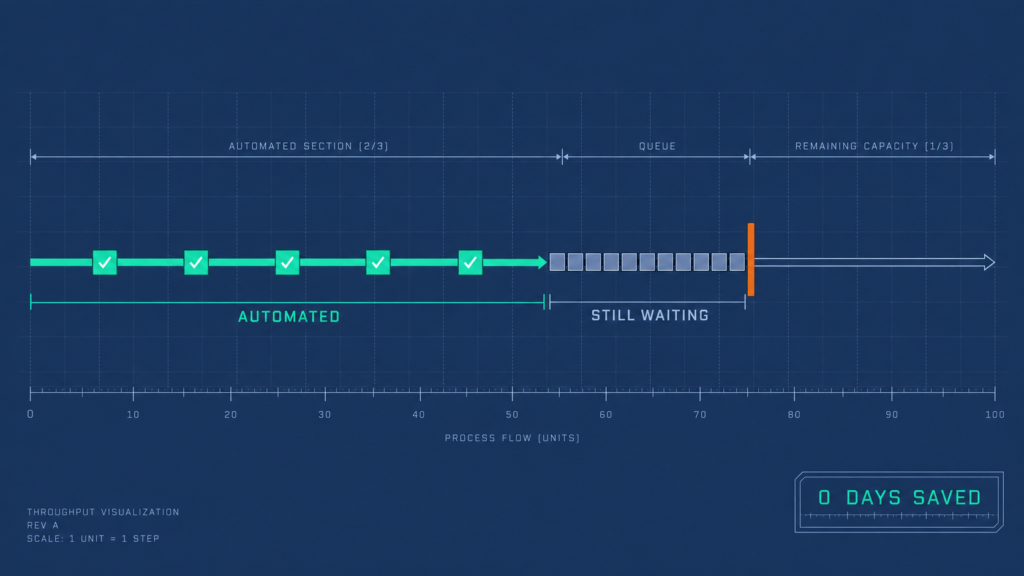
Eight years of running hiring at 250-plus roles a1 year taught me to distrust an automation that works. Working is not the same as paying.
You know the pattern. The platform went live, the configuration passed testing, and the team got retrained.
Six months on, requisitions still stall at the same step. The same three people still approve everything. The quarterly report still gets rebuilt by hand.
“We automated it and nothing changed.” I have heard that sentence said out loud in a budget review, by a Head of People who had done every single thing the implementation plan asked of her.
That is not an automation problem. It is a sequencing problem.
Most teams automate the processes that are easiest to automate. Almost nobody automates the ones that are costing them money, because those are harder to scope and the payback sits further out than a budget cycle.
Adoption was never the constraint. Nearly every HR function has automated something in the last eighteen months, and very few can point at a number that moved because of it.
20%
Of organizations realized significant or transformational value from AI, out of the 95% that implemented it in the past year.
Translation: a platform that has been paid for, a team that has been retrained, and a process running at exactly the speed it ran before. That is a capital write-off nobody logs as one, and it is sitting in most HR budgets right now.
Here’s what this blueprint contains:
- The 12 HR processes worth automating, each broken down to its trigger, its action, and the exact point it hands back to a person
- The HR Automation Sequencing Matrix, which decides what you do first, what you gate, and what you leave alone
- The stop-line: the four moments in a hiring pipeline that must stay human, named and defensible in a steering meeting
- A six-stage rollout where every stage has one artefact and one exit test, so you know when a stage is finished
HR Insights Lab approach: every number in here is either mine, from programmes I ran, or sourced and linked. None of it was commissioned by a company selling software.
What Is HR Automation?
HR automation is the use of software to execute a defined HR process from end to end, triggering it, routing it, recording it, and closing it without a person carrying the work from one step to the next. It matters operationally because the elapsed time in an HR process is mostly waiting, not working.
Here’s the difference:
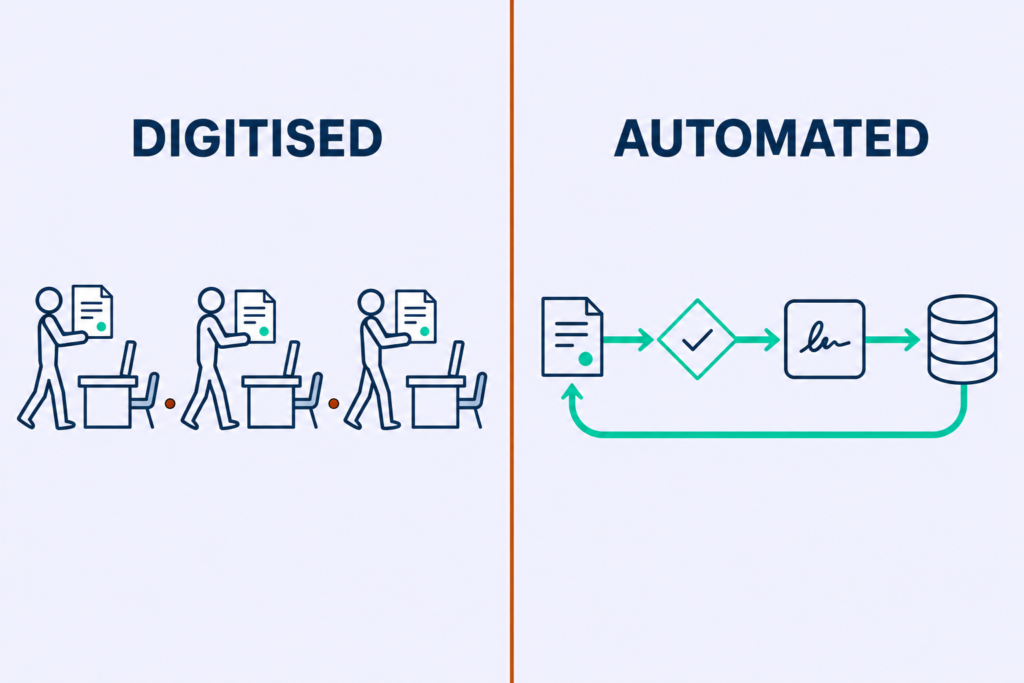
Digitisation moves a paper form onto a screen. Someone still has to pick the work up and carry it to the next desk.
Automation removes the carrying.
A PDF offer letter emailed out for signature is digitised. An offer that assembles itself from approved requisition data, routes for approval on a rule, issues for e-signature, and writes back to the HRIS on completion is automated. You can audit your own stack against that line in thirty seconds.
The Old Way
- Say “we automated HR” because a platform was purchased
- Judge the process by how good the request form looks
- Email the signed PDF to the person who updates the system
- Count a step as done when the software can display it
The Lab Way
- Name the trigger, the rule, the action, and the close for each process
- Judge the process by what updates itself after approval
- Write the signed offer back to the HRIS on completion, untouched
- Count a step as done when nobody has to remember to do anything
Every automation has four parts. Walk your worst time-off process through all four and you will find the break inside five minutes.
1
Trigger: Where The HR Automation Starts
The employee submits the request in the system of record. Not in an email, not in a chat message a manager screenshots later. If the trigger can arrive by three different routes, you do not have a trigger, you have a habit.
2
Rule: Where HR Automation Runs Thin
Balance check, accrual check, blackout-date check, team-coverage check, approval threshold. The rule layer is where most implementations are thinnest, and it is invisible in a demo because a demo runs on clean data and one happy employee.
3
Action: What The HR Automation Does Next
Route to the one approver the rule selected. Not to a group inbox, where a request sits until somebody decides it belongs to them.
4
Close: The HR Automation Step Everyone Skips
The calendar, the payroll file, and the coverage roster update themselves. The requester is told what happened. Nobody re-keys anything into a second system.
Why this works:
Readers evaluate automation by its front end, because the form and the app and the chatbot are what a demo shows. The failure almost always sits in the rule layer or the close, and neither of those appears on a screen.
◆ PRO TIP
The catch: If a person re-keys anything downstream, the process is half automated, and half-automated processes generate more work than they save. The re-keying never shows up in a project report, because whoever is doing it stopped mentioning it months ago.
HR Automation vs. HR Workflow Automation vs. Agentic AI
Three different things are being sold to you under one word. They carry completely different risk, governance, and audit profiles, and nobody in the buying conversation separates them.
Here’s the deal:
Rules-Based HR Workflow Automation: Deterministic And Auditable
This is the oldest tier and the largest. It runs if/then logic on a fixed path: same input, same output, every time, with a log that shows why.
Because it is deterministic, it is auditable. That makes it the only tier you can safely point at compliance-adjacent work without a legal conversation first.
- Requisition approval routing by cost centre and grade
- Onboarding task generation from start date and job family
- License-expiry alerts firing at 90, 60, and 30 days
- Access revocation firing off the termination record
Rules-based hr workflow automation is unglamorous, and it is where most of the recovered time comes from. Skipping it because it sounds dated next to AI is how a team buys a model to solve a problem a routing rule would have closed for a fraction of the cost and none of the exposure.
The old way: assume the newest tier is the best tier. The Lab Way: rules first, and if the process has a right answer somebody can write down, it does not need a model.
AI-Assisted HR Automation: Probabilistic And Reviewable
The model proposes. A person disposes.
This tier generates an output a human reviews before it takes effect: a drafted job description, a Boolean string, a summarised candidate profile, a first-pass interview guide, a synthesised market brief. The review is not a courtesy. It is the control that keeps this tier out of the compliance conversation entirely.
◆ FROM THE LAB
My experience: I use AI as a co-pilot, never as a decision-maker. The prompt frameworks I have built do four jobs, and only four: role clarity and skill translation, inclusive job description drafting, structured interview questions, and market insight synthesis. Every one of them ends at a human validation point that I can name.
AI accelerates thinking. Recruiters own judgment, context, and the final call.
⚠ WATCH OUT
Common mistake: Review degrades into rubber-stamping within weeks, and the team does not notice because the outputs keep looking fine. The fix is accountability for the output, not for having looked at it.
Name the reviewer, and make them sign the output under their own name and not the tool’s. A loop with nobody’s name on it is not a control.
Teams adopt this tier fastest because it is cheap and low-friction. Then they quietly stop reviewing, at which point they are running the next tier without any of the governance the next tier demands.
Agentic HR Automation: Autonomous And Consequential
Earlier systems returned an output for a person to act on. Agentic systems act.
In HR that currently means interview orchestration across the full lifecycle, semantic re-search of your existing database against a new requisition, and candidate communication sequences that adapt to how somebody responds. An agent that acts has to be bounded. An unbounded agent in a hiring pipeline can take an action against a real candidate that your organisation then has to defend.
⚠ WATCH OUT
Warning: Write three bounds before a single pilot goes live. What the agent may do on its own. What it must escalate to a person.
What it may never do under any configuration. Treat any product that cannot be configured against all three as not deployable, and put those three lines in the contract and the runbook before the pilot, not after the first incident.
◆ FROM THE LAB
The Sofia lens: I led the prompt engineering and digital transformation work inside a large engineering organisation’s recruitment function, and the agentic systems I have run have stayed in experimental pilot phases. The shift I watched happen is precise.
The earlier tools handed us inputs. The current generation executes the workflow.
What is forming out of that is human-AI teaming. The system absorbs high-volume logistics so recruiters can hold the high-touch relationship work that was always the actual job. Four directions are visible inside it: screening tools becoming sourcing co-pilots that run semantic search across the database you already own, agentic interview orchestration that manages a whole lifecycle, not a calendar invite, skills-first hiring that cuts unconscious bias by verifying capability directly, and predictive analytics that forecast who is likely to leave and not only who to hire.
I carry three worries about all of it, and I say them out loud in every steering meeting. An automation arms race, where dependence grows past competence.
A loss of personal touch that nobody notices until conversion drops. Algorithmic bias, where flawed training data quietly reinforces the hiring prejudices of the last decade.
◆ PRO TIP
Real talk: This tier is being bought on demo quality, and a demo never shows the escalation path. Everything I have seen deployed in HR is still pilot-phase. Anybody selling it to you as settled infrastructure is describing their roadmap, not your operating model.
The Risk Ladder: Matching Governance To Each Tier Of HR Automation
Governance gets applied to “AI” as one undifferentiated thing. It ends up either heavy enough to block a routing rule or light enough to let an agent go live unbounded. Scale it to what varies in the system: nothing, the output, or the action.
| Tier | What varies | Who is accountable | Governance it needs | Where it may be pointed |
|---|---|---|---|---|
| Rules-based | Nothing | The process owner | Version control and a change log | Anywhere, including compliance-adjacent work |
| AI-assisted | The output | The named reviewer | Prompt versioning and spot-audit of accepted outputs | Anywhere except the final word on an employment decision |
| Agentic | The action | The system owner | Bounded permissions, a full action log, an escalation path, and a kill switch | Never at screening, selection, discipline, or termination without a human commit |
The tier you deploy decides the legal conversation you are going to have. Screenshot that table before you take it to your next vendor meeting.
HR Process Automation: The 12 Processes Worth Automating
Vendor content covers this ground at the level of “automate recruitment” and “automate payroll,” which is useless to anybody holding a budget. Below is the same inventory broken to the grain you need to automate hr processes in practice: the trigger that fires, what the system does, and the point it hands back to a person.
| Process | Trigger | Where the human takes it back |
|---|---|---|
| Sourcing and pipeline communication | Requisition approved, or a candidate changes status | First substantive outreach to a shortlisted passive candidate |
| Interview scheduling and panel coordination | Candidate moves to an interview stage | Panel composition for senior roles, and any second reschedule |
| Background checks and adverse action | Offer accepted, or the defined post-conditional stage | Every adverse decision, before either notice is released |
| Offer generation, approval, and e-signature | Hiring decision recorded | Any offer outside band, every counter-offer, every verbal conversation |
| Onboarding and pre-boarding | Signed offer | The manager’s first conversation and the 30-day check-in |
| Employee service desk and policy requests | An employee asks a question in any channel | Pay disputes, grievances, accommodations, leave, performance |
| Time-off requests and absence approvals | Request submitted | Coverage exceptions and leave types with statutory implications |
| Time, attendance, and shift scheduling | Clock events, roster publication, or a swap request | Any exception that implies a conversation |
| Payroll processing and tax filing | Pay period close | Every variance above threshold, before release |
| Benefits administration and open enrollment | New hire, qualifying life event, or the annual window | Life-event edge cases, appeals, and family decisions |
| Performance reviews and check-in cadences | Cycle open, anniversary, or a defined interval | The rating, the calibration, the narrative, and the delivery |
| Offboarding, access revocation, and exit data | Resignation recorded or termination date set | The exit conversation, and any contested termination |
Candidate Sourcing And Pipeline HR Automation
Trigger: a requisition is approved, or a candidate enters a status. What automates: job distribution to configured boards, semantic re-search of your existing database against the new requisition, status-change acknowledgements, and nurture sequences to silver medalists on a cadence.
Handoff: the first substantive outreach to a shortlisted passive candidate is written and sent by a recruiter. Always. What goes wrong: the nurture sequence keeps firing at somebody a recruiter has already called personally, and the candidate sees the seam.
The old way is to automate outreach so you can reach more people. The Lab Way is to automate everything around the outreach so the outreach itself can stay human and slow. More applications has never meant better hiring, and the right five candidates beat the wrong five hundred every time I have tested it.
◆ FROM THE LAB
My experience: The Silver Medalist Re-Engagement Loop is exactly the kind of cadence a system holds well and a human forgets. I re-contact strong runners-up at 3, 6, 9, and 12-month intervals, and over two years that produced four hires from re-engagement alone.
One of them became a team lead. Another referred three external hires who joined. The scheduling was automated, and every message was mine.
Interview Scheduling HR Automation
Trigger: a candidate moves to an interview stage. What automates: availability collection, panel assembly against calendars and interviewer load, invitations with joining instructions, reschedules, reminders at 24 hours, and feedback chasing at 24 and 72 hours post-interview.
Handoff: panel composition for senior or sensitive roles is set by a person, as is any second reschedule. Two reschedules almost always means something a bot cannot read. What goes wrong: load-balancing rules that ignore interviewer seniority, so the same three people absorb everything anyway.
Fix the panel model before you automate against it. On a 420-hire programme I ran, batch interviews and structured scorecards cut interviewer load enough to lift recruiter productivity by roughly 35%, and none of that was available until the panel rules were rewritten first.
Background Check And Adverse Action HR Automation
Trigger: offer accepted, or whichever stage you have defined as post-conditional. What automates: consent and disclosure collection, vendor submission, status polling, result routing, and generation of the pre-adverse and adverse action notices with the statutory waiting period enforced as a rule.
Handoff: every adverse decision is reviewed and committed by a named person before either notice goes out. What goes wrong: the waiting period gets configured as a reminder, somebody releases early, and the process that was supposed to protect you is now the evidence against you.
⚠ WATCH OUT
Red flag: The statutory waiting period is a hard gate in the workflow. Not a calendar reminder, not a task in somebody’s list.
Adverse action is where FCRA exposure concentrates, it is procedurally exacting, and it is the one process on this page where “automate it and move on” is actively dangerous. Involve counsel in how your workflow is configured.
Offer Generation And E-Signature HR Automation
Trigger: the hiring decision is recorded. What automates: offer assembly from approved requisition data covering grade, band, location differential, and start date, approval routing against the delegation-of-authority matrix, issue for e-signature, countersignature, and write-back to the HRIS on completion.
Handoff: any offer outside band, every counter-offer, and every verbal conversation that precedes the document. What goes wrong: the template pulls from the requisition and not the negotiated outcome, so the automated document contradicts what your recruiter agreed on the phone an hour earlier.
E-signature is not automation. It is digitisation, by the line drawn earlier in this blueprint. The automation is the assembly and the write-back.
◆ FROM THE LAB
The Sofia lens: My high-water mark for offer acceptance is 90%, and speed is a large part of why. Offer cycle time is where accepted candidates get lost to a competitor who moved faster, and manual assembly is where band and equity errors get introduced. Take the document build off a person and you protect both numbers at once.
HR Onboarding Automation And Pre-Boarding
Trigger: the signed offer. What hr onboarding automation covers: equipment and access provisioning raised against job family, account creation, payroll and tax form collection, benefits enrolment window opening, the pre-start communication sequence, day-one and week-one task generation, 30/60/90-day check-in creation, and buddy assignment from a roster.
Handoff: the manager’s first conversation, the team introduction, and the 30-day check-in itself. The scheduling automates. The conversation does not.
What goes wrong: provisioning is automated but the dependency order is not, so the laptop arrives before the account exists and a new hire spends day two waiting.
◆ FROM THE LAB
My experience: When I ran a First Look internal mobility policy, Time-to-Productivity came in at 28 days for internal moves against 67 days for external hires. That gap is 39 days of salary paid against partial output, per hire. Onboarding speed is a productivity lever with a dollar value attached, and every hour of it that a system can own is an hour that was never a hospitality exercise.
The old way is an onboarding checklist emailed to the manager. The Lab Way gives every task a system owner, a due date derived from the start date, and an escalation if it is not closed, which leaves the manager’s list containing only the things a manager must do in person.
Employee Service Desk HR Automation
Trigger: an employee asks a question, in whatever channel they already live in. The best Slack integrations HR automation teams deploy work because they answer inside the chat tool people are already in, without asking anybody to open a portal.
What automates: retrieval-based answers to policy questions with a citation back to the source document, ticket creation and routing by category, status updates, and closure with a satisfaction prompt.
⚠ WATCH OUT
Warning: Five categories route to a person on first contact, never after a failed deflection attempt. Pay disputes, grievances, accommodations, leave of absence, and performance.
Write that list into the configuration before go-live. The people who most need a human are the ones a poorly configured bot traps in a loop.
◆ PRO TIP
The catch: The moment deflection rate becomes a KPI, the system starts optimising to avoid humans and not to resolve issues. Deflection is a cost metric wearing a service metric’s clothes. Measure first-contact resolution, and measure how fast the sensitive categories reach a person.
Time-Off And Absence HR Automation
Trigger: the request is submitted. What automates: balance and accrual checks, blackout and coverage rules, approval routing to a single named approver, calendar and roster updates, payroll file updates, and auto-approval for any request that clears every rule.
Handoff: anything hitting a coverage exception, any leave type with statutory implications, and any pattern the system flags. What goes wrong: auto-approval thresholds set once and never revisited, so the rule stops matching how the team staffs itself two reorganisations later.
Every demo in this category shows a request approved inside a chat tool. Nobody demos the rule layer, which is the only part that determines whether the approval was correct.
Time And Attendance HR Automation
Trigger: clock events, roster publication, or a shift-swap request. What automates: exception flagging against scheduled hours, overtime threshold alerts before the threshold is crossed, labour allocation to cost centres, swap approvals inside defined rules, and premium calculation feeding payroll.
Handoff: every exception that implies a conversation. Repeated lateness, an overtime pattern, a swap that breaks a rest rule. What goes wrong: the system flags exceptions nobody is assigned to action, so a clean-looking dashboard hides an unmanaged backlog that surfaces at quarter end as payroll correction work.
How to execute:
Route each exception to a named person at the moment it occurs, with a due date attached. A monthly exception report that nobody owns is not a control, it is a document.
Payroll HR Process Automation
Trigger: pay period close. What automates: input aggregation from time, benefits, and status changes, variance detection against the prior period, gross-to-net calculation, statutory filing, garnishment administration, general ledger posting, and payslip distribution.
Handoff: every variance above threshold is reviewed and released by a named payroll owner. No pay run is released on a rule alone. What goes wrong: variance thresholds set so wide that nothing trips them, which is functionally identical to having no check at all.
◆ PRO TIP
The honest downside: Automation does not eliminate payroll errors. It relocates them from arithmetic to configuration. That is a real improvement and a more honest claim, because a configuration error is systematic, detectable, and fixable once, while an arithmetic error is random and endlessly recurring.
Benefits And Open Enrollment HR Automation
Trigger: a new hire, a qualifying life event, or the annual enrolment window. What automates: eligibility determination, window opening and closing, reminder cadences to the unenrolled, elections capture, carrier file generation and transmission, dependent verification chasing, and confirmation statements.
Handoff: any qualifying-life-event edge case, any appeal, and any conversation where an employee is making a decision about a family circumstance.
⚠ WATCH OUT
Watch out: Carrier file errors surface weeks later, at the point of claim, when an employee discovers they do not have coverage they believed they had. Nothing in your enrolment dashboard will show you this. Reconcile the transmitted file against elections before the window closes, not after the first claim is denied.
The old way chases the unenrolled by hand in the final week. The Lab Way runs the cadence from day one of the window and reserves the team’s final week entirely for the exception queue, which is the only part of enrolment that ever needed a person.
Performance Review HR Automation
Trigger: the review cycle opens, an anniversary date lands, or a defined check-in interval arrives. What automates: cycle launch, form distribution, reviewer and peer-feedback assignment, nudges, completion tracking, calibration pack assembly, and distribution reporting.
Handoff: the rating, the calibration conversation, the written narrative, and the delivery. All four, without exception.
◆ PRO TIP
Anti-pattern: The nudge cadence becomes the whole experience, and managers complete the form to stop the emails. Completion hits 95% and the cycle gets declared a success. Automate the logistics to zero, then spend the recovered time on calibration and on the quality of what gets written, because that is the only part of a review cycle that changes anything.
Offboarding And Access Revocation HR Automation
Trigger: a resignation is recorded, or a termination date is set. What automates: access revocation across every connected system on the effective date and hour, asset return tracking, final pay calculation including accrued balances, benefits continuation notices, knowledge-transfer task generation, and exit survey dispatch.
Handoff: the exit conversation itself, and any termination where the reason is contested or sensitive.
Offboarding shares nothing with onboarding except a date field, which is why grouping the two is how offboarding gets under-specified everywhere. Onboarding failure costs productivity. Offboarding failure is a security incident.
⚠ WATCH OUT
Watch out: Revocation covers the systems inside your identity provider and misses the ones bought on a department card. Drive revocation from an access inventory reconciled quarterly, and treat the checklist as the audit record, not the process. An offboarding checklist that assumes a leaver’s manager knows every system they had access to is a guess with a signature on it.
The HR Automation Sequencing Matrix
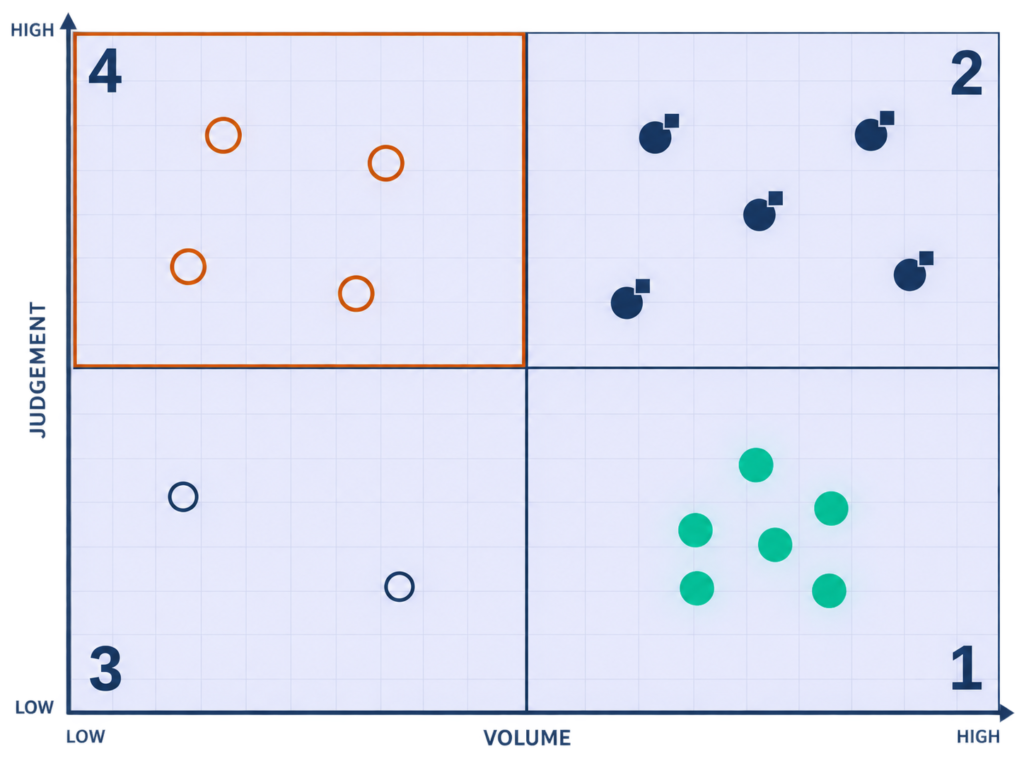
You now have twelve candidates, a finite budget, and no defensible basis for choosing an order. Most teams default to whichever process the loudest stakeholder complains about, or whichever module the incumbent vendor is pushing this quarter.
Here’s how to build it:
Two axes. Transaction volume runs low to high along the bottom, judgement required runs low to high up the side.
That produces four quadrants, and the quadrants read in a fixed order.
| Quadrant | Volume | Judgement | What you do |
|---|---|---|---|
| Tier 1 | High | Low | Automate now, and automate fully |
| Tier 2 | High | High | Automate the logistics, gate the decision |
| Tier 3 | Low | Low | Automate only when it is nearly free |
| Tier 4 | Low | High | Leave it alone, and resist the vendor who says otherwise |
Work the Tier 1 quadrant to completion before you buy anything for Tier 2.
The old way automates whatever annoys people most. The Lab Way automates what costs most per unit of judgement, because volume multiplied by triviality is the return, and it is calculable before you spend a dollar.
This is the same logic I apply to Talent Acquisition through Intelligence-Led Sourcing and the Talent Supply Chain. Treat the function as a system to be designed, not a queue to be worked. The matrix is that argument pointed at operations.
Tier 1: The HR Automation You Should Have Finished Already
Here is who lives in this quadrant.
- Time-off approvals
- Interview scheduling and panel coordination
- Onboarding task generation
- Access revocation
- Attendance exception detection
- Payroll input aggregation
- Enrolment reminder cadences
They share one property. The right answer is written down and does not change with context, which means a person in the loop contributes nothing except delay.
The Sofia test:
If a person still touches any step in these processes other than an exception, this tier is not finished. Not “mostly done.” Not finished.
Here is the part that surprises leadership teams: most organisations running an AI pilot have not finished Tier 1. They bought a platform that could do this work and never checked whether it was configured to. Holding a licence is not the same as having done the work, and this problem is not local to you.
0 to 6
Percentage-point increases in operational use of AI and automation across HR domains, year on year. Most organisations remain in pilot mode.
Source: McKinsey & Company, HR Monitor 2026, surveying roughly 1,300 HR professionals and 5,500 employees across 10 countries
Translation: a sector full of pilots that never reached operational use. A pilot that never operationalises is a cost with no offsetting return, and it is being repeated across the industry while the foundational tier sits half-configured.
Tier 2: HR Automation That Needs A Human Gate
Occupants: adverse action, offer generation outside band, performance calibration inputs, any screening or ranking of candidates, disciplinary workflows, and leave-of-absence administration.
The rule for this tier is one sentence. Automate every step up to the decision, then stop hard.
A gate is not a review screen a user clicks past. It is a named accountable person who commits the decision under their own name and has the standing to say no.
⚠ WATCH OUT
Red flag: Ask the vendor to show you the screen where the process stops and waits. If there is no such screen, the product is not built for this tier, whatever the capability matrix says. The software will happily run the whole path, and nobody notices the gate was optional until something is contested.
Tier 3 And Tier 4: Where HR Automation Stops Paying
Tier 3 is low volume and low judgement. Automate it only if it comes free inside something you are already configuring, because a six-week implementation to save forty minutes a month is a negative return no business case survives.
Tier 4 is low volume and high judgement. Grievance handling, accommodation requests, redundancy consultation, senior-hire assessment, and the exit conversation.
These are infrequent, high consequence, and entirely context-dependent, and automation degrades every one of them.
◆ PRO TIP
Real talk: Tier 4 processes are the ones HR finds most draining, which is precisely why a vendor pitch to automate them lands so well in the room.
Automate the work you resent. Staff the work you dread. Those are two different lists, and confusing them is how a function ends up with a chatbot handling grievances.
My position on retention applies here without modification: retention problems are systems failures, not compensation failures. If a Tier 4 process is exhausting your team, the fix is role design and manager capability. Software will not touch it.
HR Automation Benefits: What The Numbers Look Like When It Works
Every page on this subject carries a benefits section, and every one of them is a list of adjectives. Improved efficiency, reduced errors, better employee experience.
None of it survives contact with a CFO.
What follows is ordered by how defensible each benefit is in a budget conversation, not by how good it sounds in a deck.
Cycle Time: The HR Automation Benefit That Compounds
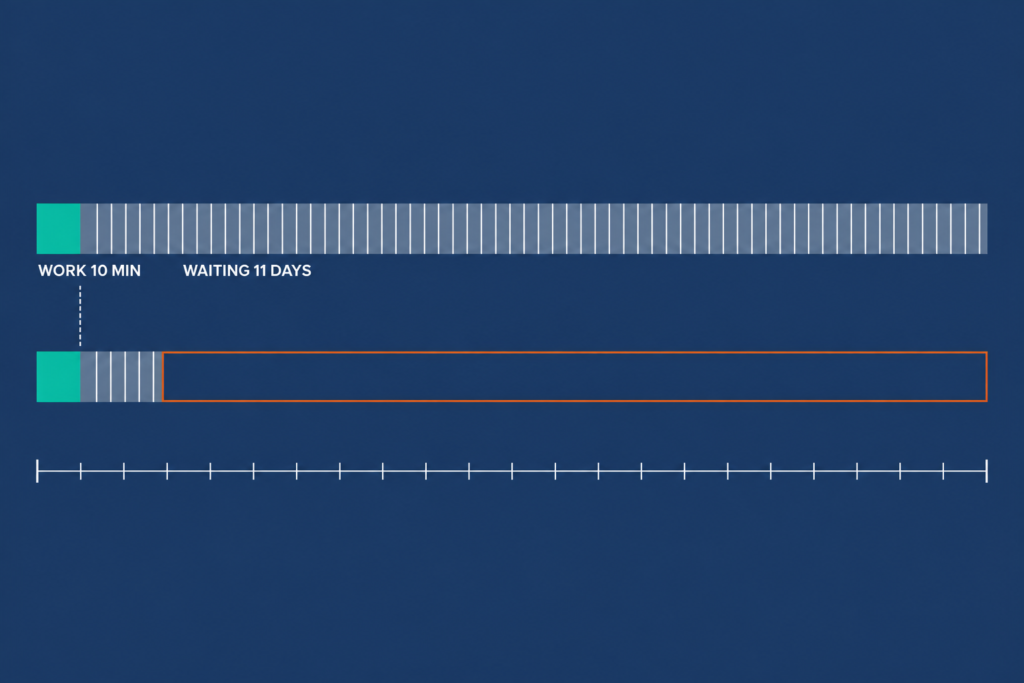
Automation removes queue time, not work time. The hours a request spends waiting for somebody to notice it, not the minutes it takes to action once noticed.
In most HR processes, queue time is the overwhelming majority of elapsed time. That is why automating a five-minute task can remove three days, and why a leader cannot explain to their executive team why a ten-minute job takes eleven days.
◆ FROM THE LAB
Real implementation: A global engineering organisation I worked with needed somewhere between 350 and 500 people hired inside 8 to 12 weeks to hit a business ramp-up date. Customer support, operations analysts, junior engineers, and sales support, all at once. Limited interviewer capacity, high drop-off risk, and a quality bar nobody was willing to move.
We planned capacity backward from the business start date, forecasting recruiter bandwidth, interviewer availability, and sourcing throughput week by week. Sourcing ran multi-channel across portals, referral drives, early-career funnels, and SLA-tracked vendor partners. Then we took the logistics off people entirely: standardised pre-assessment criteria, batch interviews, structured scorecards, daily recruiter stand-ups, and a real-time tracker dashboard that made the programme steerable during the week and not reportable after it.
We delivered 420-plus hires in 10 weeks. Average Time-to-Fill fell from 32 days to roughly 18 to 20, offer-to-join came in above 90%, and 90-day retention held at 85 to 88%.
Recruiter productivity rose by about 35%. The project launched on time.
Here is the part that matters for your business case. Human involvement did not go down. Automating the logistics is what made the human capacity available in the first place.
32 to 18
Days of average Time-to-Fill across a 420-plus hire programme, with recruiter productivity up roughly 35% over the same period.
The same effect holds at the senior end, where volume is low and queue time is worse. On an automation engineering scale-up built on competitor talent mapping, Time-to-Offer went from 68 days to 34.
The old way measures how long the task takes. The Lab Way measures how long the request waits, because queue time is the number automation attacks and nobody is measuring it.
Error Rate And Compliance Exposure Under HR Automation
The honest version of this argument is more persuasive than the vendor version. Automation does not eliminate errors. It relocates them from execution to configuration.
That is a genuine improvement. A configuration error is systematic, detectable, and fixable once. An execution error is random, individually small, and endlessly recurring.
Your audit changes shape after that trade. You stop sampling transactions and start reviewing rules, and you sample transactions only to confirm the rules are doing what you believe they are doing. Payroll, adverse action, enrolment, and access revocation are where this matters most.
◆ PRO TIP
The honest downside: One misconfigured rule produces two hundred identical errors where a manual process would have produced two different ones. Anybody who has lived through an audit knows this, which is why the claim that automation “ensures compliance” costs a writer the reader’s trust in a single sentence.
Capacity Reallocation Is The Real HR Automation Return
The realistic return on HR automation is capacity. A business case built on headcount reduction fails to deliver more times than it lands, and it poisons adoption on the way down.
On that 420-hire programme, reallocated capacity showed up as recruiters moving off coordination and onto market mapping and candidate relationships. That is what the 35% productivity gain bought.
AI does not replace recruiters. It replaces the parts of the job that stopped recruiters from being effective in the first place.
Capacity only converts to value under one condition, and it is a hard one. The recovered hours have to be assigned to named higher-value work before the automation goes live. Leave that undecided and the hours dissipate into whatever arrives next, and you cannot evidence the business case at review.
The Old Way
- Build the case on FTE reduction
- Promise a headcount number to get it approved
- Deliver capacity, get judged against headcount
- Record a working project as an internal failure
The Lab Way
- Build the case on reallocated hours
- Name the destination for those hours before go-live
- Agree the measurement with finance in advance
- Report the destination work at review, with its output
Candidate Experience And The HR Automation Benefit Nobody Bounds
Experience improves through automation for one mechanical reason: responsiveness stops depending on how busy your team is. A candidate who gets a status change within an hour at 4pm on a Friday in peak season is having a better experience than one who waits four days because a coordinator was underwater.
Here’s the difference:
Responsiveness is not contact. A pipeline that is fast and entirely impersonal converts worse than one that is slower and human at the right moments.
Automation improves reliability of response. People improve experience. Conflating the two is how an organisation ends up with a fast pipeline nobody wants to be in, and the next section of this blueprint is entirely about where that line sits.
Decision Data As A By-Product Of HR Automation
The most durable benefit is the one nobody buys for. An automated process emits timestamped, structured events by design: where requests stall, which approver is the bottleneck, which requisitions age and at which stage, how long each pipeline stage takes in reality.
That data does not exist in a manual process at any price, because nobody logs the waiting.
Here is the instruction that makes it real. Decide which three questions you want answerable before you configure anything, because the event schema is set at build time and retrofitting it is a project of its own.
- Where in this process does a request wait longest, measured in elapsed hours and not in touches?
- Which approver or stage is the bottleneck this quarter, by name and by median hold time?
- Which stage do requisitions age in, and does that change by grade, location, or job family?
◆ FROM THE LAB
The Sofia test: I can tell you that competition analysis lifted Quality of Hire by 12%, that mapping the talent market in adjacent industries lifted it by 14%, and that skill-based pipelines built on market analysis lifted it by 30%. Those numbers exist because the process was instrumented to let me see a delta when I changed the method.
If you cannot answer your three questions today, you are not short of an analytics module. You are short of an event schema.
The Real Cost Of HR Automation And How To Build The Business Case
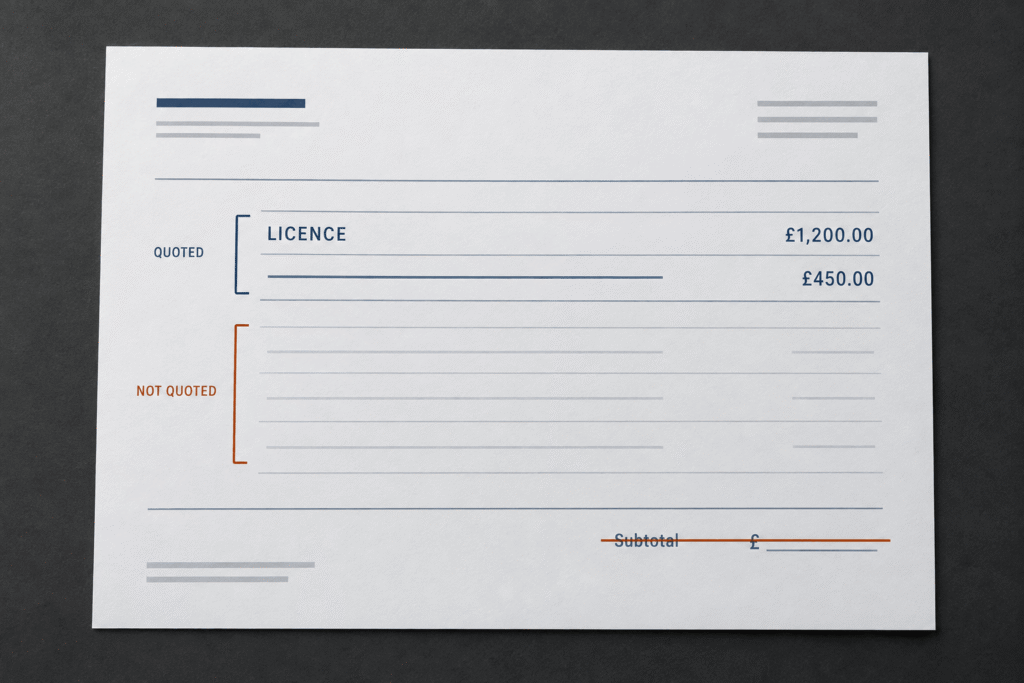
Nobody publishes the arithmetic. The headline ROI figures on this topic come from studies the software vendor commissioned about its own product, which an HR Leader cannot take into a CFO conversation and survive the first question.
The Five-Line HR Automation Cost Stack Vendors Quote Two Of
- Licence or subscription. Quoted, always, and prominently.
- Implementation and configuration. Sometimes quoted, almost always under-scoped.
- Integration. The connectors, the middleware, the data mapping, and the HRIS work order sitting behind all three. Rarely quoted.
- Change and enablement. Process redesign, documentation, manager training, and the productivity dip during transition. Never quoted.
- Ongoing ownership. The named person who maintains the rules as your organisation changes. Never quoted, and the most common reason automation decays.
Sanity-check any proposal against one proportion: on most HR automation projects, licence is well under half of total three-year cost. When you are comparing HR automation solutions, you are comparing line one of five, and the four lines nobody printed are where the overrun lives.
⚠ WATCH OUT
Red flag: Treat any proposal that does not name an ongoing owner as incomplete, and send it back. Budgets get approved against the licence figure, the project overruns on integration and change, and the overrun gets recorded as poor project management when it was a scoping failure from the first meeting.
The Baseline You Have To Measure Before You Buy HR Automation
You cannot evidence a return you did not baseline. After go-live the baseline is unrecoverable, and twelve months later you will be asked what the automation delivered and will only have anecdotes.
Spend two weeks on this before any vendor conversation. A baseline measured after the demo is a baseline shaped by the demo.
1
Elapsed Time Per Instance
End to end, queue time included. Sample thirty real instances. Do not estimate this in a workshop, because a workshop returns the time people believe the process takes.
2
Touches Per Instance
How many people handle it. Count the person who forwards an email to the person who can approve it, because that touch is a full handoff with a queue behind it.
3
Error And Rework Rate
Over one full quarter. Rework is the invisible half of this number, and the people doing it have long since stopped logging it as work.
4
Fully Loaded Hourly Cost
Of every role doing the touching. Get this from finance, in writing, so the number in your case is the number finance already agreed to.
The HR Automation Business Case Model A CFO Will Accept
| Line | What it contains | How to calculate it |
|---|---|---|
| 1. Hours recovered per year | Capacity released by the automation | Instances x touches x minutes saved per touch |
| 2. Value of recovered hours | Stated as capacity, never as savings | Hours x fully loaded hourly cost |
| 3. Hard cost removed | Agency fees avoided, overtime reduced, rework eliminated | Prior-year actuals minus forecast |
| 4. Risk cost avoided | Stated as a range with the assumption shown | Incident frequency x estimated exposure |
| 5. Total three-year cost | All five lines of the cost stack | Licence + implementation + integration + change + ownership |
| 6. Payback month | The number the CFO will quote back at you | Cumulative lines 3 and 4 against line 5 |
◆ FROM THE LAB
Real implementation: On a senior engineering hiring programme inside a global engineering organisation, cost per hire ran at roughly $7,800 to $9,000. Agency fees and long cycle times were the two drivers, and agency work was priced at 18 to 22% of package on roles worth $54,000 to $60,000, which put a single placement between $9,500 and $12,000.
We moved the spend to direct sourcing, internal referrals, and pre-built talent pools. Agency reliance dropped 60 to 70%. Four of six senior roles that would have gone to an agency were filled without one.
Cost per hire landed between $3,600 and $4,600, a 45 to 55% reduction. Time to fill went from 70 to 80 days down to 45 to 50. I could report all of that only because the before number existed.
◆ PRO TIP
The catch: Line two is capacity, and a CFO will discount it. Lead with lines three and four, win the argument on hard cost removed and risk avoided, and present capacity third with the discount already applied. A single headline ROI percentage with no arithmetic behind it is exactly what a finance director is trained to ignore.
Automating The Pipeline Without Losing The Human Touch
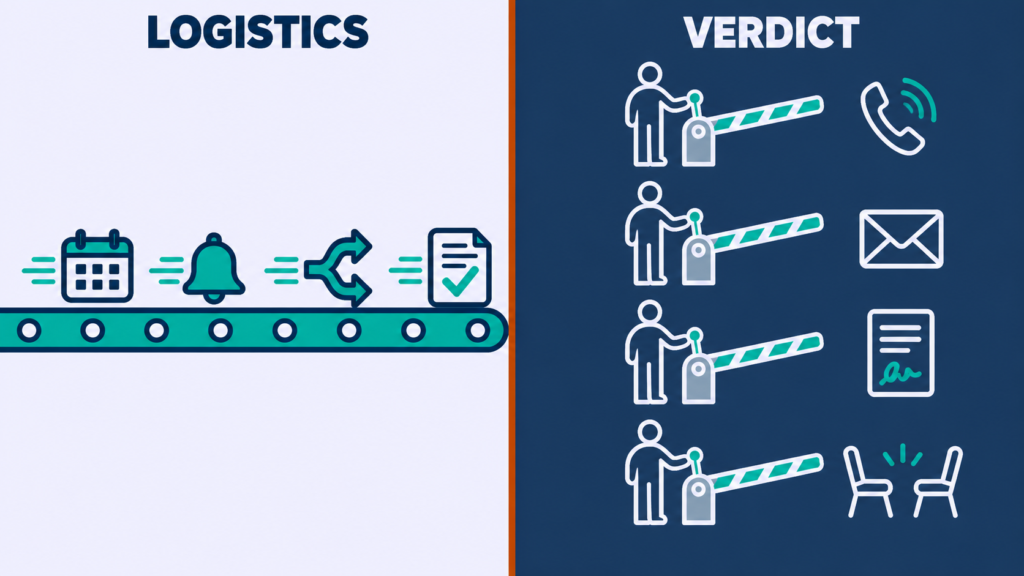
Everybody agrees automation should not go too far. Almost nobody can say where too far is, so the line ends up wherever the software’s default settings put it.
Here is a line you can defend in a steering meeting.
The HR Automation Rule: Automate The Logistics, Never The Verdict
Automate the logistics. Never automate the verdict.
Logistics is anything that moves a person through a process: scheduling, reminding, routing, confirming, collecting, updating. A verdict is anything that changes a person’s standing: advanced or rejected, approved or denied, hired, rated, promoted, exited.
Logistics: Automate Without Limit
- Collecting availability and booking the panel
- Confirming receipt and sending status changes
- Routing a request to the right approver
- Chasing feedback and updating every system
Verdicts: A Person Commits, Always
- Advancing or rejecting a candidate
- Approving or denying a request with consequence
- Rating, promoting, or disciplining somebody
- Ending an employment relationship
But here is the catch: a knockout question on a hard requirement looks like a filter and behaves like a verdict. Treating it as a filter is how organisations sleepwalk into automated rejection at scale without ever deciding to.
The Sofia test:
If a candidate or an employee would reasonably want to appeal it, it is a verdict. That single question settles every argument I have ever had about which side of the line something sits on.
The Four Pipeline Moments HR Automation Must Leave Alone
1
First Contact With A Passive Candidate
Automation may research and assemble the context. The message is written and sent by a recruiter. Get this wrong and you have a silver medalist who will not take your call again, which is a cost that shows up two years later in a pipeline you no longer have.
2
The Rejection Of Anyone Who Has Met A Human
Automation may schedule it and log it. The notification is personal and comes from the person they met. Get this wrong and the referral source who sent them stops referring, quietly and permanently.
3
The Offer Conversation
Automation assembles the document. A person makes the call before it arrives in an inbox. Get this wrong and a candidate reads life-changing news from a template, which is where acceptance rates go to die.
4
Any Conversation About Someone’s Circumstances
Accommodations, leave, grievance, exit. Automation may route and record. Get this wrong and you have taught an entire workforce that the system is where difficult things go to be ignored.
The old way personalises the automated message. The Lab Way leaves four moments un-automated entirely, then automates everything around them hard enough to pay for the time those four take.
◆ FROM THE LAB
The Sofia lens: My 10/10 Rule is ten minutes of candidate research plus a ten-line personalised outreach email. People tell me that does not scale. It scales precisely because the research half is the part automation can now assemble for me, which leaves the ten lines, and ten lines is affordable at any volume I have ever run.
◆ FROM THE LAB
Real implementation: A referral programme I inherited was doing what democratic referral programmes do, which is generate a trickle of submissions from everybody and very few hires from anybody. The standard fix is more communication and a bigger bonus. I did the opposite and looked at who was already producing.
The top 5 to 10% of referrers got named Talent Scouts. Real status, VIP perks, and a quarterly meeting with me where we talked about what the teams were building and who they needed next.
Not a campaign. A relationship, held on a calendar.
One senior engineer produced 11 referrals. Nine were hired. Eight are still with the company.
Programme-wide, referral conversion ran at 82% against a company average of 31%, and we avoided roughly $48,000 in agency fees in the process.
Every piece of that came out of conversations a workflow could not have held. The scheduling of those quarterly meetings was automated. Nothing else about them was.
Rejection Is The Test Case For HR Automation
Rejection is where stated principles meet actual configuration. It is the single configuration choice that does the most reputational damage when it is wrong.
Three tiers, sorted by how much of the candidate’s time you took.
- Rejected at application, before any human contact. A prompt, clear, automated notification. Speed here is a kindness, not a discourtesy.
- Rejected after meeting someone. A message from the person they met, written by that person.
- Rejected at final stage. A call. Not an email that offers a call.
The volume objection answers itself with arithmetic. At most organisations the third category is a handful of people per role, and the hours it costs are a fraction of what automating the first two categories properly gives back.
⚠ WATCH OUT
Common mistake: One rejection template for everyone, sent fast, and called efficiency. It burns the exact relationships that pay you back later.
Four of my hires over two years came from re-engaging previously rejected candidates, one of whom became a team lead and another of whom referred three external hires. None of that return exists if the rejection burned the relationship on the way out.
This has stopped being a question of tone. Automation is now visibly removing entry points, not only steps, and the people affected are the ones with the least standing to object.
22%
Of CHROs report that at least one business leader in their organization has stopped hiring for entry level roles due to AI automation.
Source: the same Gartner survey of heads of HR cited earlier in this blueprint
Translation: nearly a quarter of HR functions are watching their entry-level pipeline close from the inside. Whatever you decide about tone, decide it knowing that.
Human-AI Teaming: The HR Automation Model That Replaces Balance
Balance implies a dial with a correct setting. Teaming implies a division of labour with an owner on each side, and only one of those gives a team something to do on Monday morning.
The Old Way: Find The Balance
- Debate how much automation is too much
- Set a principle nobody can operationalise
- Let the vendor’s defaults decide by attrition
The Lab Way: Assign The Work
- System takes scheduling, parsing, rediscovery, market mapping, compliance workflow, and status communication
- Recruiter takes judgement, context, relationship, and the final call
- Audit the boundary every quarter and move it deliberately
⚠ WATCH OUT
Warning: Two failure modes make this model credible only if you name them out loud. An automation arms race, where dependence on the system grows past the team’s competence to check it.
Algorithmic bias, where flawed training data reinforces the hiring prejudices the organisation spent a decade trying to remove. Put both on the quarterly boundary audit agenda.
Put the boundary audit in a calendar with an owner’s name against it. That, and not a principle, is what keeps this line where you put it.
How To Implement HR Automation: A Six-Stage Rollout
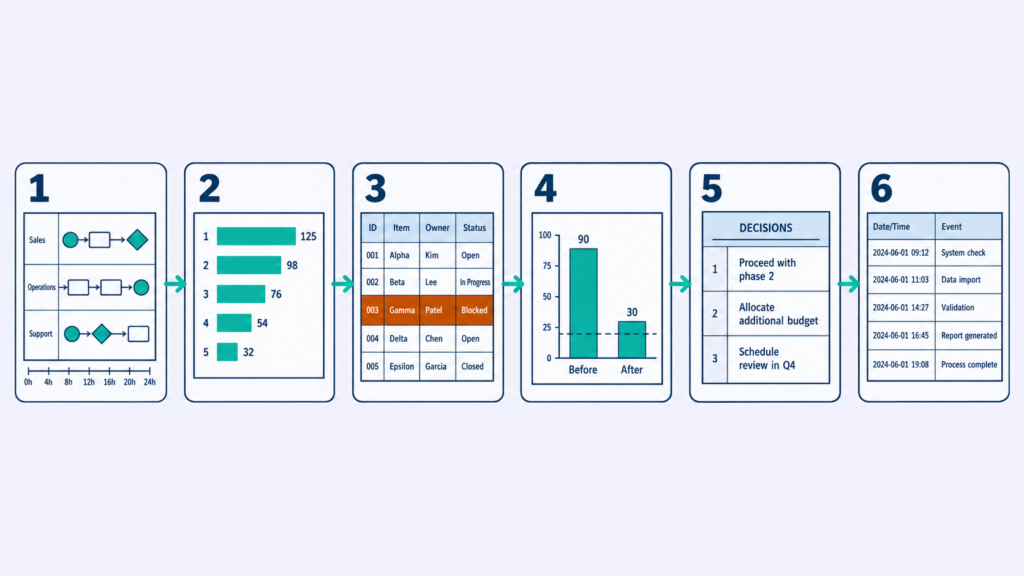
Implementation advice on this topic is a list of intentions. Map your processes, pilot before full rollout, train your team and support adoption.
All correct, and none of it tells you what a stage produces or how you know it is finished.
How to execute:
Six stages. Each has one action, one artefact, and one exit test.
1
Stage 1: Map The HR Automation Target Process
Map the process as it is run, not as the policy describes it. Sit with the people doing it. Record every touch, every handoff, and every wait.
Capture queue time separately from work time. The gap between the two is the automation opportunity, and it is routinely 90/10.
Artefact: a swimlane with elapsed time on every step and a touch count. Exit test: somebody who does not work in HR can read the map and correctly predict where the process stalls.
The old way starts from the process document, which nobody follows. The Lab Way starts from a stopwatch and thirty real instances. I map the talent market before I write a job description for exactly the same reason: mapping before building is cheaper than rebuilding after.
2
Stage 2: Sequence HR Automation With The Matrix
Place every mapped process on the sequencing matrix, volume on one axis and judgement on the other, then sort into the four tiers.
Take the Tier 1 quadrant and rank it by annual queue-hours removed, which you now have from Stage 1. That ranked list is your roadmap, and every position on it carries an hours number.
Artefact: a ranked Tier 1 backlog with hours attached. Exit test: you can explain to a sceptical CFO why item one sits above item two without using the word “strategic.”
The old way starts with whatever is most visibly painful. The Lab Way ranks by queue-hours removed per unit of implementation effort and lets the number choose, because a roadmap built from stakeholder pressure collapses the first time finance asks why.
3
Stage 3: Define HR Automation Gates First
Before configuration starts, write down every point where the process must stop and wait for a person. Who that person is by role, what they are accountable for, and what happens if they do not act inside the SLA.
Do this at stage three and not stage five. A gate designed in is a requirement. A gate retrofitted into a live workflow is a change request with a price attached.
Artefact: a gate register listing step, role, accountability, SLA, and escalation. Exit test: every Tier 2 process on the roadmap has at least one gate with a named role against it.
⚠ WATCH OUT
Anti-pattern: Human oversight gets asserted in the project charter and never specified anywhere else. The build then produces a workflow that runs end to end and an oversight step nobody owns.
Write the gate register before the statement of work, and make it a contractual requirement. A configuration preference is not the same thing.
4
Stage 4: Pilot HR Automation With One Team
Pick the top item on the Tier 1 backlog and one team with a manager who will tell you the truth.
Run it for one full cycle. A complete pay period, a complete requisition, a complete enrolment window. A two-week pilot on a monthly process proves nothing at all.
Measure the same four things you baselined in Stage 1. Artefact: a before-and-after on elapsed time, touches, error rate, and cost.
Governance is what makes a pilot steerable. On a ten-week volume programme I ran, daily stand-ups and a real-time tracker dashboard meant we corrected inside the week. Explaining afterwards was never the job, and the same mechanic works at pilot scale.
The Sofia test:
The pilot team asks to keep it. If they are indifferent, the process was not the bottleneck you thought it was, and knowing that before you scale is worth the whole pilot. Piloting until the configuration works and piloting until the numbers move are two different finish lines.
5
Stage 5: Train Managers On HR Automation
Your HR team will learn the system because it is their job. Managers will not, and managers sit inside almost every automated HR workflow as the approver, the reviewer, or the gate.
Train them on the decision they now own and the SLA attached to it. Not on the interface.
Artefact: a one-page decision guide per manager-facing workflow, covering what arrives, what they must decide, by when, and what happens if they do not. Exit test: a manager who has never seen the system can action a request correctly from the one-pager alone.
Adoption stalls at the manager layer and gets diagnosed as resistance. It is almost never resistance. It is an absence of training aimed at the people who hold the decisions, and the sector has a number for how bad that gap has become.
8%
Of HR leaders believe their managers have the skills needed to use AI effectively today.
Translation: the manager layer is the constraint on your rollout, not the technology and not your HR team. A gate owned by somebody who has not been trained on the decision is a delay with extra steps.
6
Stage 6: Review And Retire HR Automation Quarterly
Automations decay because organisations change and rules do not. Set a quarterly review with three questions.
Which rules fired in ways nobody intended. Which exceptions are now frequent enough to become rules. Which automations no longer serve a process that still exists.
Retire that third category deliberately. Artefact: a standing quarterly review with a named owner and a change log. Exit test: you can show a twelve-month change log with entries in it.
◆ PRO TIP
The catch: An empty change log is a finding, not a pass. A log with no entries means nobody is reviewing, because no organisation goes twelve months without changing something a rule depends on. Treat the blank page as the alarm it is.
Why HR Automation Fails: Five Failure Modes
Challenges sections describe obstacles you might meet. What follows is different. Each one names the mechanism, the early warning sign, and the fix, because knowing what broke is more use than knowing what could.
Failure Mode 1: HR Automation On Broken Processes
The most common and most expensive of the five. A process with unclear ownership, redundant approvals, and undefined exception handling gets automated as it stands.
That hard-codes the dysfunction and removes the informal workarounds people were quietly using to make it survivable. Early warning sign: a Stage 1 mapping exercise that produces more than two approvals with no documented reason for the second.
The fix is to redesign before you build, and to treat any approval nobody can justify as a deletion candidate.
⚠ WATCH OUT
Anti-pattern: Buying automation as a substitute for process redesign, because redesign is political and software is procurable. Delete the steps you cannot justify, then automate what survives. Software does not have opinions about whether a step should exist.
Failure Mode 2: HR Automation Pilot Purgatory
The pilot runs. It works. It never scales.
The mechanism is that nobody defined what the pilot was proving or what would trigger the scale decision, so the pilot becomes a permanent state that consumes attention and returns nothing. Early warning sign: a pilot with no end date.
The fix is to write the scale criteria and the kill criteria into the same document as the pilot plan, before it starts, and to hold the scale-or-kill decision on the date you wrote down.
◆ PRO TIP
Real talk: “Let’s extend the pilot while we gather more data” is how organisations mistake activity for progress, and a live pilot is the most convincing form of activity there is. A pilot has a date, a scale threshold, and a kill threshold, all written before it starts.
Failure Mode 3: The Manager Layer Never Adopts HR Automation
The workflow goes live. HR uses it. Managers keep emailing.
The mechanism has two parts: managers were trained on the tool and not on the decision, and the old path was never closed. Early warning sign: an inbox still receiving requests the system is supposed to route.
The Old Way
- Communicate the change until people come around
- Send managers a link to the release notes
- Leave the email route open as a courtesy
- Call the result cultural resistance
The Lab Way
- Train the decision with the Stage 5 one-pager
- Close the alternative path completely
- Make the system the only route in
- Measure adoption weekly for the first quarter
⚠ WATCH OUT
Common mistake: Doing the training and skipping the closure. Both parts are required. Adoption is near impossible while a faster informal path stays open, and the informal path wins every time because it always has.
Failure Mode 4: Screening HR Automation That Filters Out Your Best Candidate

Automated screening optimises for the profile it was given, and that profile is almost always assembled from who was hired before.
The mechanism is credential proxies. Degree, title, years, employer tier, all standing in for capability. Anybody who acquired capability by an unusual route gets removed before a human sees them.
Early warning sign: a shortlist that looks like the existing team. The filter’s false negatives are invisible by construction, so the process appears to work right up to the moment somebody counts what it removed.
◆ FROM THE LAB
Real implementation: I needed a manufacturing systems analyst. Traditional sourcing on job titles and degree requirements returned 14 qualified resumes, and none of them moved me.
So I inverted the funnel. I stopped searching for people who held the title and searched for the evidence the title was supposed to represent: PLC programming projects, lean manufacturing case studies, anybody who had documented the work. That is what I call Inverted Sourcing Funnels, and it returned 62 candidates.
The person I hired was a factory-floor supervisor who had taught himself Python. No relevant job title, no matching degree.
He would have been filtered out by any screening rule I could have written from the previous hire’s profile.
He now leads digital transformation work. Credential gatekeeping does not protect your hiring bar. It removes the people who cleared it by an unexpected route, and you never find out.
How to execute:
Screen on verifiable capability signals in place of credential proxies. Then sample the rejected pile: take twenty auto-rejected applications per requisition and have a person read them.
That sample is the only way to see what your filter is costing you. A filter nobody audits is a hiring policy nobody wrote.
Failure Mode 5: No HR Automation Owner After Go-Live
The implementation partner leaves. The project team disbands. The automation has no owner.
Rules drift out of alignment as the organisation reorganises. Approvers leave and their gates silently route to nobody. Integrations break on a vendor API change that nobody was watching for, which is a real risk with any of the HR automation tools in your stack, because their release cycles are not yours.
Early warning sign: you cannot name, in one sentence, who owns a given automation today. Ownership gets assumed to sit with HR Ops generically, which means it sits with nobody specifically.
⚠ WATCH OUT
Watch out: Name a person in the go-live checklist and put the maintenance hours into their objectives. This is a small, boring, permanent cost, and a business case that omits it understates the total. Unowned automation decays at exactly the speed your organisation changes, which is faster than anybody budgeted for.
HR Automation And US Compliance: Local Law 144, The EEOC, And What Legal Needs To See
Vendor pages list compliance management as a process to automate. Almost none of them address the compliance risk created by automating, which for a US employer in 2026 is a material omission.
What follows flags the obligation and stops there. I am an HR practitioner, not a lawyer, and none of this is legal advice.
NYC Local Law 144 And HR Automation Decision Tools
The obligation: employers using an automated employment decision tool to substantially assist hiring or promotion decisions for roles in New York City are subject to Local Law 144, which carries an independent bias audit requirement, a published audit summary, and candidate notice obligations.
The scope point is where organisations get caught. The trigger is the location of the role, not the location of your company.
The action: inventory which of your tools score, rank, or filter candidates, and take that inventory to counsel. Whether a given tool falls in scope is a legal question, and it is one your vendor cannot answer on your behalf.
⚠ WATCH OUT
Red flag: Screening tools get procured by HR and IT without anybody asking whether they trigger a bias-audit obligation, and the question then surfaces at audit. By then the tool is embedded. Maintain your own inventory of every tool that scores, ranks, or filters a person, and review it with counsel annually.
EEOC Exposure On Automated Screening And HR Automation
The obligation: automated screening and selection tools remain subject to federal anti-discrimination law, including Title VII disparate-impact analysis and ADA obligations around reasonable accommodation in assessment.
The consequence for you: a tool that produces adverse impact is the employer’s exposure, not the vendor’s, whatever the contract says. Liability does not transfer with the software.
The ADA angle is the one most commonly missed. Timed or video assessments can disadvantage candidates who would have been entitled to an accommodation nobody offered them.
- What is your adverse-impact testing methodology for anything that scores, ranks, or filters a person?
- Will you provide the results in writing, and how recently were they run?
- What accommodation routes exist inside the assessment flow, and how is a candidate told about them?
Ask those before purchase, keep the response on file, and have counsel review it. A vendor who will not answer them has told you something useful.
WARN Act Implications When HR Automation Changes Headcount
The obligation: where automation contributes to a decision that reduces headcount at scale, federal WARN Act notice obligations and their state equivalents may apply, and the thresholds are specific.
The trigger is the employment action and its scale.
The action: if an automation business case contains a headcount reduction, counsel is involved at business-case stage, not at implementation. This is a further argument for building your case on capacity.
◆ PRO TIP
The catch: “It was an efficiency programme” is not a distinction the statute recognises. The obligation attaches to the action and its scale, and the reason behind it does not change the arithmetic. If your case contains an FTE number, counsel reads the case.
The HR Automation Documentation Pack Legal Will Ask For
Compliance requests arrive with short deadlines, and the evidence gets assembled from scratch across three teams. Build the pack as a by-product of the rollout stages and it is complete by design.
- An inventory of every tool that scores, ranks, filters, or decides on a person
- The gate register from Stage 3, showing where a named human commits each decision
- Vendor adverse-impact testing documentation, dated
- The change log from Stage 6
- The retention schedule for automated decision records
- Candidate notice wording and the accommodation-request routes
This does more than satisfy a request. An organisation that can produce this pack on demand can answer a board question about AI governance in one meeting, not one quarter. Have counsel review the pack once it exists.
HR Automation Trends Shaping 2026 And Beyond
Trend sections tend to forecast. This one takes a position on what is being deployed now and what each deployment changes, including the direction nobody else is covering.
From Screening Bots To Sourcing Co-Pilots In HR Automation
The first wave of recruiting AI pointed at screening, which is the work of reducing an inbound pile. The current direction points at the opposite end of the funnel.
Semantic search across the database you already own surfaces the person who applied for something else eighteen months ago and matches this requisition now.
Why this works:
It converts your ATS from a compliance archive into an asset you already paid for. It moves AI out of a filtering role, where the legal exposure concentrates, and into a discovery role, where it does not.
Same technology, a fraction of the risk, better candidates. This is the Talent Supply Chain argument arriving as a product category.
Agentic Interview Orchestration And Its HR Automation Boundary
This goes beyond scheduling. Systems now manage the interview lifecycle end to end: availability, panel assembly, rescheduling, reminders, feedback chasing, and stage progression against defined rules.
The appeal is honest. Coordination is the single largest consumer of recruiting operations time, and this category genuinely removes it.
⚠ WATCH OUT
Watch out: Orchestration is logistics and is squarely automatable. Stage progression is a verdict and is not.
Buying the suite as one undifferentiated thing is how you end up with a system advancing and rejecting candidates on rules nobody reviewed. Buy the logistics, disable the progression, and put your Stage 3 gate on the boundary between them.
Skills-First Verification Replacing Resume Parsing In HR Automation
The direction of travel is away from parsing a document that describes capability and toward verifying capability directly. Portfolios, repositories, work samples, structured assessment.
This is the most consequential trend on the list, because it attacks the mechanism behind the screening failure mode. You cannot inherit historical bias through a credential proxy if you have stopped using credential proxies.
Skills-based hiring gets discussed as a philosophy and implemented as a parser with new field names. Inverted Sourcing Funnels is the version that changes an outcome, and it costs recruiter hours to run, which is the honest part nobody mentions.
Predictive Retention Analytics As HR Automation
The extension from “who should we hire” to “who is likely to leave,” built on engagement and performance trend data. The genuine value is real: a proactive retention conversation happens while something can still change.
Two problems go unmentioned in vendor content. A retention prediction about a named individual is sensitive personal data with access-control implications, and it needs to be held accordingly.
⚠ WATCH OUT
Warning: A manager who is told somebody is a flight risk behaves differently toward that person, which can produce the outcome the model predicted. The governance rule: predictions inform systemic action, never individual action, unless a named accountable person commits to it.
Give the organisation the pattern. Do not give managers the list of names.
◆ FROM THE LAB
My experience: Retention problems are systems failures, not compensation failures, and they are certainly not individual mysteries a model needs to solve. Unclear career paths, weak manager capability, role design that does not match how the work gets done, thin internal mobility.
Every one of those is visible in aggregate and fixable at the system level, which is exactly why systemic action beats a watchlist here.
The Counter-Trend: Deliberate De-Automation Of HR Automation
Nobody is covering this one, which is why it belongs here. Organisations are selectively reversing automation at specific candidate and employee touchpoints, and treating it as a differentiator.
A real person calling final-stage candidates. A named HR contact per business unit. An appeal route to a human on any automated decision.
This is the market correction to a decade of deflection metrics, and it is a resource-allocation argument. These organisations are not automating less.
They automate the logistics layer harder, so they can afford to un-automate the moments that decide whether people say yes.
How To Choose HR Automation Software Without Buying A Platform You Won’t Use
No tool names here, and no comparison table. What follows is the selection discipline that decides whether the tool you pick survives eighteen months.
Buy HR Automation Software For The Process You Mapped
Your ranked Tier 1 backlog from Stage 2 is the requirement specification. Any capability that is not on it is a cost until proven otherwise.
How to execute:
Score vendors only against that backlog. Record everything else on a separate line labelled “future,” so it stays visible in the total cost and stays out of the decision.
Then make the demo yours. Every platform demos well against a feature list and poorly against a specific workflow, which is why the demo should run on your mapped process and not the vendor’s scenario. When you evaluate HR automation software against a feature comparison, you systematically favour the broadest platform over the best fit for the processes costing you money.
The HR Automation Integration Reality Check
This is the cost line that sinks projects. List every system the automated process must read from or write to, then ask three questions per system.
- Is there a native connector, or is this a build?
- What does it sync, at field level, in both directions?
- At what frequency, and what happens when a sync fails?
⚠ WATCH OUT
Common mistake: “Integrates with” in marketing copy routinely means a file export on a schedule, which is not an integration for a workflow that needs current data. Ask to see the field-level mapping, in writing, before signature. The logo wall is not an answer.
◆ FROM THE LAB
My experience: Capability and fit are different purchases, and I have watched teams confuse them expensively. Take a platform like Avature, which is genuinely powerful and genuinely customisable. It is a platform, not a plug-and-play system, and it rewards enterprise teams with ATS admins and real change-management discipline.
Hand the same product to a lean team that wants simplicity over flexibility and the capability becomes the problem. Buy for the operating model you have.
Three HR Automation Questions Vendors Would Rather Avoid
- Show me the screen where this process stops and waits for a person, and show me how that gate is configured.
- What is your adverse-impact testing methodology for anything that scores, ranks, or filters a person, and will you provide the results?
- Who maintains the rules after go-live on my side, and how many hours a month does that take at your average customer?
Buyers ask about features and price. These three predict whether the implementation is still working in eighteen months.
None of these are hostile questions. A good vendor answers all three without hesitating.
HR Automation FAQ
What Is HR Automation?
HR automation is software executing a defined HR process end to end, triggering it, routing it, recording it, and closing it without a person carrying the work between steps. Digitisation puts a form on a screen and still needs somebody to move it along. Automation removes that carrying: access revocation firing off a termination record, onboarding tasks generating from a start date.
What HR Processes Should Not Be Automated?
Any process that issues a verdict on a person: advancement, rejection after human contact, rating, discipline, or termination, plus any conversation about someone’s circumstances. The test is simple. If a candidate or employee would reasonably want to appeal it, a person commits that decision, not a rule.
How Much Does HR Automation Cost?
Budget five lines, not one: licence, implementation, integration, change and enablement, and ongoing ownership. Expect licence to sit well under half of your three-year total. The figure that matters is payback month, calculated against a baseline you measured before any vendor conversation happened.
Will HR Automation Replace HR Jobs?
The realistic return is capacity, not headcount, and business cases built on headcount reduction fail to deliver what they promised more times than they land. Automation replaces the parts of the job that stopped HR being effective in the first place. The honest caveat: entry-level roles are where the pressure is genuinely showing, with 22% of CHROs reporting a leader who has stopped hiring for them.
Is Automated Hiring Legal In The United States?
Yes, and it is regulated. Automated employment decision tools used for New York City roles fall under Local Law 144’s bias audit and notice requirements, and all automated screening remains subject to Title VII and the ADA. Liability sits with the employer, not the vendor, so involve counsel before you deploy.
Where To Start With HR Automation This Quarter
Early in my career I automated the process I found most annoying. It felt like progress for about six weeks.
The results were predictable. The queue moved, it did not disappear, and two approvals nobody could justify got hard-coded into a system.
The hours I recovered went into whatever shouted loudest, so I could not evidence a single thing at review.
Here’s what changed everything: I stopped choosing by irritation and started choosing by volume multiplied by triviality. The sequencing matrix, the gate register, the six stages with an exit test on each one. That is the whole blueprint, and it is the difference between owning a platform and running a function.
This has stopped being an efficiency question. What it now costs to get HR automation wrong is the people who know how to run it.
50%
Of enterprises lacking a people-centric AI strategy will lose their top AI talent by 2027 to competitors who prioritize workforce enablement over basic adoption. Only 27% of executives have a fully developed AI strategy, and just 20% believe their workforce is truly AI-ready.
Source: Gartner, 13 May 2026
The organisations getting value out of HR automation are not the ones automating the most. They are the ones who decided in advance what they would never automate, then automated everything else without flinching.
Three things separate them from the ones still piloting. A sequenced backlog with hours attached, a gate register with names on it, and a person who owns the rules next year.
All three are unglamorous. All three are the difference.
Pick two things this quarter. One Tier 1 process you can finish, and one gate you can write down with a name against it. Implement them over the next 90 days and measure both against the baseline you took first.
The next Lab blueprint goes deeper into the child pages of this stack, and subscribers get the frameworks before anyone else does. If you are working through the sequencing on your own stack, find me on LinkedIn and let’s compare notes. I am curious which quadrant your team argues about most.
