
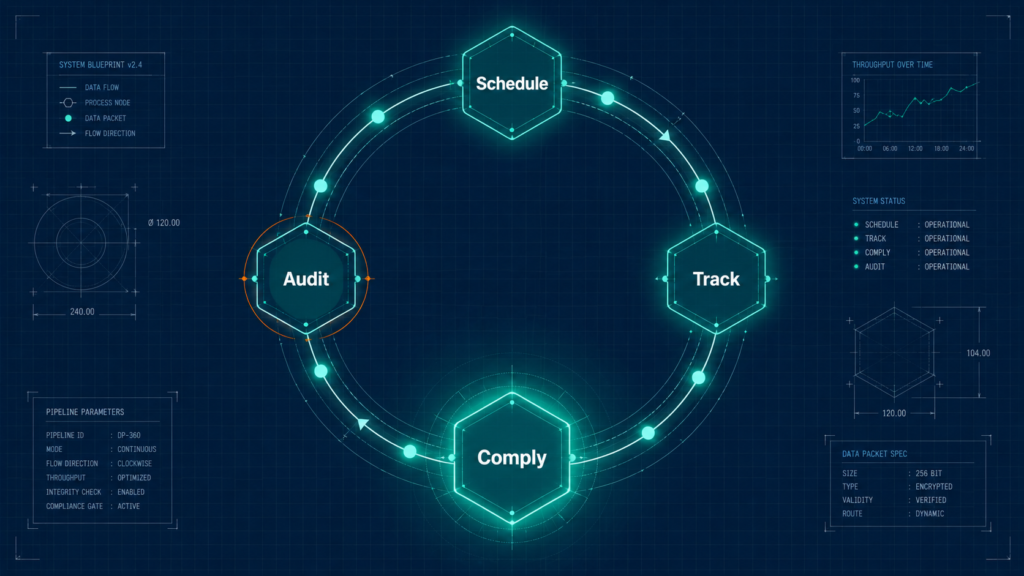
When you’re managing 250 hires a year, onboarding training stops being an L&D problem. It becomes an operations problem.
Most organisations run employee training the same way they manage their calendar — manually, reactively, and in constant danger of something critical slipping through. Spreadsheet-tracked completions. Email reminders sent three weeks before a certification expires, if anyone remembers to send them. No real-time view of who’s compliant, who’s overdue, and whether the organisation could survive an audit tomorrow.
This isn’t a training problem. It’s a systems problem.
The right employee training management software doesn’t just deliver courses. It gives HR leaders operational control over the entire training lifecycle, from scheduling and enrollment through certification management, compliance reporting, and the analytics that prove it’s working.
36%
Only 36% of organisations have learning and development programmes robust enough to yield measurable business results — despite 91% of L&D professionals agreeing that continuous learning is more critical than ever.
The gap between intent and outcome isn’t a motivation problem. It’s an infrastructure problem.
This guide gives you the tools to close it. Here’s what’s inside:
- A clear definition of the category, including the TMS vs. LMS distinction that prevents the most expensive buying mistake in HR tech
- An honest assessment of what running training without a system is actually costing you — in compliance exposure, admin hours, and retention signals you’re missing
- A 6-feature evaluation framework, with operational grading of each feature and specific questions to ask in every vendor demo
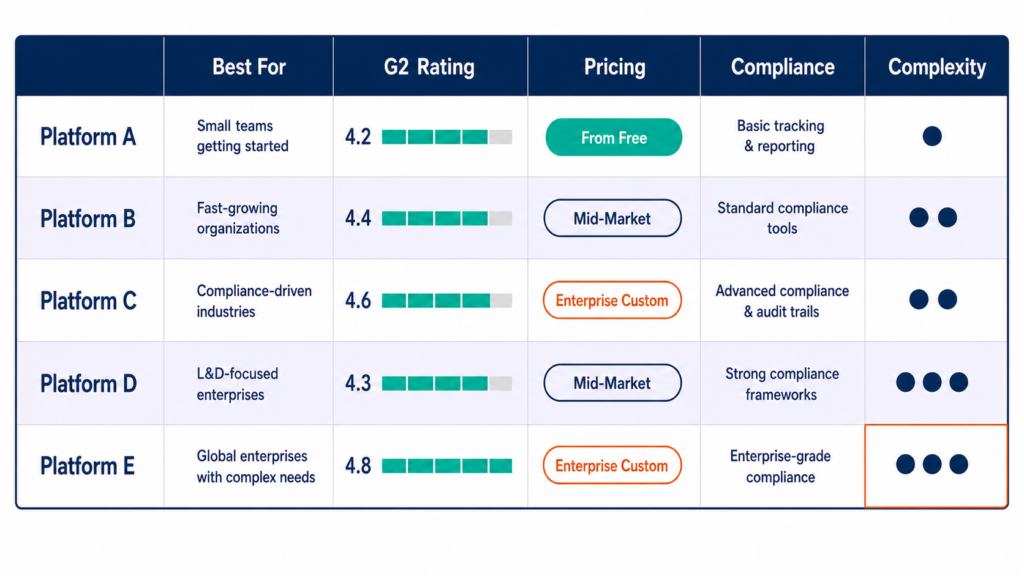
- A vendor-neutral review of the top 5 platforms, based on G2 and Capterra data, with honest “not right for” assessments for each
- A 5-step buying framework that replaces demo impressions with a structured evaluation filter
- An implementation playbook and ROI measurement methodology in language your CFO will actually respond to
What is Employee Training Management Software?
The definition — and why the TMS vs. LMS distinction changes what you buy
Employee training management software is a platform that centralises the operational lifecycle of employee learning — scheduling, enrollment, completion tracking, certification management, compliance reporting, and audit readiness — giving HR leaders real-time visibility into who has completed what, who is overdue, and whether the organisation is compliant right now.

Most buyers call it an LMS and start searching there. That’s the first mistake.
Why this distinction matters in practice:
A Learning Management System (LMS) manages content delivery and the learner experience: course creation, video hosting, assessments, learner progress. A Training Management System (TMS) manages training operations: scheduling, enrollment automation, compliance tracking, certification expiry, and audit reporting.
The LMS answers: “What are employees learning?” The TMS answers: “Who completed what, when, are they compliant, and who is overdue?”
Many modern platforms blend both. But the buyer needs to know which capability is primary and which is secondary before evaluating a single vendor. Most don’t.
The result is predictable. An HR team researches “best LMS,” picks the platform with the highest G2 score, signs a 3-year contract, and discovers six months in that it doesn’t handle compliance tracking the way a regulated business needs it to. The next 18 months are spent trying to bolt on workarounds that the platform was never designed to support.
The old way
- Search “best LMS” and open the top-ranking listicle
- Book demos with the 3 platforms that have the highest G2 scores
- Choose the one with the most impressive demo
- Discover post-signature that it doesn’t handle compliance tracking at the level you need
- Spend 18 months building workarounds
The Lab Way
- Map your primary use case before opening a single review site
- Decide whether content delivery or training operations management is your primary need
- Build your must-have criteria list before booking a demo
- Use demos to validate against your criteria, not to form your criteria
- Sign a contract you won’t regret in year two
⚠ WATCH OUT
Common mistake: searching for an “employee training platform” without first deciding whether your primary need is content delivery (LMS) or training operations management (TMS). The two look similar in demos. They perform very differently when you’re running a compliance audit.
The Four Training Management Use Cases — Which One Are You Actually Solving for?
Before evaluating any platform, map which of these four use cases is your primary driver. A platform optimised for one may actively underserve another.
Compliance and mandatory training. Ensuring certifications don’t lapse, regulatory training is completed on schedule, and audit trails are ready on demand. This is the most common enterprise need, and the one where platform failure has the highest financial consequence. Primary feature requirement: certification tracking, automated expiry alerts, one-click audit reporting.
Onboarding and new hire training. Structured programmes from day one through the 90-day milestone. Speed and consistency are the measures that matter. Primary feature requirement: role-based auto-enrollment, structured learning paths with dependencies, completion tracking tied to onboarding milestones. For more on how to design these programmes from the ground up, see “Employee Training Programs — Examples and Design Patterns.”
Skills development and learning paths. L&D programmes for career growth, upskilling, and role transitions. Content richness and learner engagement are the measures. Primary feature requirement: learning path builder with sequencing and prerequisites, content library integrations, learner-visible progress tracking.
External training. Training partners, customers, or vendors. Multi-portal architecture and separate learner environments are non-negotiable. A platform built for internal training often cannot cleanly separate external learner access, branding, and reporting.
◆ PRO TIP
Pro tip: Most mid-market HR teams are solving for use cases 1 and 2 before they’re ready for use case 3. Buy for your current operational reality, not your three-year aspiration. The most capable enterprise platform will be actively painful if your team has no LMS admin and your training library is currently three PDFs.
Top 5 Employee Training Management Software (Based on HR industry Reviews)
The platforms below were selected based on frequency of appearance in top competitor articles, verified review volume on G2 and Capterra (200+ reviews minimum), Gartner Peer Insights recognition where available, and demonstrated fit for HR-specific use cases. No platform was selected based on partnership, affiliate relationship, or paid placement. For a broader view of the training software landscape, including vendors outside the top 5, see our companion comparison. All pricing should be verified directly from each vendor’s official pricing page at time of evaluation — pricing changes, and the figures here are research-based as of June 2026.
TalentLMS — Best for SMB to Mid-Market Simplicity
TalentLMS is the clearest entry point for organisations that need a real training system without the admin overhead or budget of an enterprise platform. Most teams are live within a day. The free plan (up to 5 users) makes it a genuine zero-risk starting point — use it to validate internal adoption before committing to a paid tier.
Pros
- Fastest setup in its class — most teams are live within a day, no dedicated LMS admin required
- Free plan available (up to 5 users) — genuine zero-risk validation before committing
- G2: 4.6/5 (700+ reviews), Capterra: 4.7/5 (596 reviews) — consistently highest ease-of-use scores in its segment
- Clean admin interface manageable without LMS experience
- Strong SCORM and xAPI support — bring your own content from any authoring tool
Cons
- Pricing jumps are steep — Core ($109/month for 100 users) to Grow ($229/month for 500 users) is a significant step; plan the upgrade path before you sign
- Reporting is functional but not enterprise-grade — the custom report builder is limited compared to Docebo or Absorb
- Advanced compliance workflows require workarounds on lower tiers
Not right for: Organisations with complex compliance requirements, advanced reporting needs, or 1,000+ users who need more than functional-level analytics. If compliance tracking is your Tier 1 requirement, evaluate Absorb or Docebo instead.
Docebo — Best for Enterprise AI-powered Personalisation
Docebo is not for every organisation. It’s for organisations running complex, multi-audience training programmes at enterprise scale, with the admin capacity to configure a powerful platform and the budget to match. Its AI-powered learning personalisation — dynamic learning paths, automated content recommendations based on role and skills gaps, predictive analytics — is among the most capable in the market.
Pros
- AI-powered personalisation at genuine enterprise scale — content recommendations based on role, skills profile, and learning history
- Multi-audience architecture — train employees, partners, and customers from a single admin instance
- Extensive integration ecosystem across HRIS, CRM, and performance management platforms
- Strong reporting with advanced analytics — one of the most configurable dashboards in its tier
Cons
- Enterprise pricing — typical mid-enterprise contracts run $30,000–$80,000/year; verify current pricing directly with Docebo as their tier structure changed in 2025
- Implementation complexity — most organisations need 8 to 16 weeks for a full rollout
- Not appropriate for lean HR teams without a designated LMS admin
⚠ WATCH OUT
Docebo’s ROI is heavily dependent on admin capacity. Organisations that go live without a designated LMS admin typically see adoption plateau at 40 to 50% within 90 days. The AI personalisation only works as well as the configuration behind it. This is a platform, not a plug-and-play solution — the organisations that get maximum value are the ones that invested in proper setup and change management.
Not right for: Organisations under 500 employees, HR teams without LMS admin capacity, or budgets under $20,000 per year.
360Learning — Best for Collaborative, Peer-Driven Learning at Scale
360Learning’s differentiation is collaborative course creation. The platform enables internal subject-matter experts to build and share training content, not just L&D teams. In organisations where expertise is distributed across the workforce and top-down content creation cannot keep pace with the speed of knowledge change, this is a significant operational advantage.
Pros
- Collaborative course creation — any employee can build a course in minutes, with L&D oversight and quality control
- Peer review and feedback loops built natively into the content creation workflow
- Most transparent pricing model in the enterprise tier — Team plan at $8/user/month is publicly listed
- Strong for onboarding content specifically — peer-created onboarding material is faster to produce and more current than L&D-produced content
Cons
- Advanced customisation (branding, reporting depth) requires the Enterprise tier at custom pricing
- Not ideal for compliance-heavy training — the collaborative content model is not designed for mandatory, auditable certification workflows
- Platform value scales with engagement — low-usage organisations get significantly less value per dollar than high-usage ones
Not right for: Compliance-first organisations, regulated industries that need strong audit trails for mandatory certifications, or HR teams that want L&D to control all content creation centrally.
Absorb LMS — Best for Mid-to-Enterprise Learner Experience and Compliance
Most training management platforms force a trade-off: strong learner experience or strong compliance depth, rarely both. Absorb LMS is one of the few that handles the combination. It carries consistently the highest learner-experience ratings in its segment (G2: 4.6/5, Capterra: 4.5/5) alongside genuine compliance tracking capability, access to 20,000+ pre-built courses, and AI-powered learning path recommendations.
Pros
- Learner-first interface design — consistently the highest-rated learner experience in its segment
- AI-powered learning paths with automated content recommendations
- Access to 20,000+ pre-built courses, reducing content creation burden significantly
- Strong compliance tracking with certification expiry automation
- Multi-audience design — employees, customers, and partners from one admin instance
Cons
- No public pricing — custom quotes only; budget $10,000–$20,000/year for a 500-person mid-market deployment as a planning estimate (verify with the vendor)
- Reporting is functional but some users note it’s less flexible than Docebo for custom analytics
- Implementation is more involved than TalentLMS — expect 4 to 8 weeks for a mid-market rollout
Not right for: Organisations that need transparent upfront pricing, lean HR teams wanting same-week go-live, or sub-200 employee companies where the pricing-to-value ratio doesn’t hold.
LearnUpon — Best for Multi-Audience Training (Employees, Customers, and Partners)
LearnUpon’s differentiator is its multi-portal architecture. One admin instance, multiple fully branded learner environments for different audiences — employees, channel partners, resellers, customers — each with separate content, branding, and reporting. For organisations that need to train external audiences at scale, not just internal employees, this is the architecture that makes it operationally clean rather than a workaround.
Pros
- Multi-portal architecture — one admin instance, separate branded environments per audience
- Capterra: 4.8/5 — consistently the highest-rated platform for reliability and customer support in its segment
- Seamless integrations with Teams and Zoom — strong for organisations where virtual instructor-led training is a primary delivery method
- Exceptional support reputation — users consistently cite support quality as a key retention driver
Cons
- No public pricing — typical mid-market annual contracts in the $15,000–$25,000 range (verify with vendor)
- Content authoring tools are less capable than Docebo or 360Learning
- Less suited to organisations whose training is entirely internal with no external training audience
◆ PRO TIP
Pro tip: Ask LearnUpon to show you the multi-portal setup in the demo — not just the learner view, but the admin view of managing two separate portals simultaneously. That’s where you evaluate whether the architecture works for your use case or whether the “multi-portal” feature is more complicated in practice than it looks in the demo slide.
Not right for: Purely internal training programmes with no external audience, organisations prioritising content authoring capability, or budgets under $15,000 per year. For a full comparison of platforms beyond these five, including options at different price points and use case fits, see our extended software comparison.
Core Features that Actually Matter in Employee Training Management Software
Every competitor article lists features. Almost none of them tell you what a bad implementation of each feature looks like in practice, or which feature matters more depending on your use case. That’s the gap this section closes.
64%
of organisations either have learning programmes with limited adoption or no meaningful initiatives at all. Only 36% are “career development champions” — those whose programmes yield measurable business results. The six features below are what separates the two groups operationally.
The six features that separate effective training management software from expensive noise are: training scheduling and enrollment automation, compliance and certification tracking, reporting and analytics, content management and learning paths, HRIS integrations, and mobile access and learner experience.
Training Scheduling and Enrollment Management
This is the feature that most clearly separates a TMS from a pure LMS. A strong TMS handles: automated enrollment triggered by role, location, or job level; waitlist management for limited-seat sessions; calendar integration with Google and Outlook; trainer and room booking; pre-course communications; and post-course follow-up automation.
The evaluation questions that matter: Can it trigger enrollment automatically based on HRIS data, so a new hire in a specific role is auto-enrolled in the right onboarding track without anyone touching it? Can it manage both virtual and in-person sessions from one interface? Does it give learners a self-service portal, or does every enrollment require HR to action it manually?
At high hiring volume, the automation of the onboarding training track alone — auto-enroll based on start date and role, auto-send pre-course materials, auto-flag completions to the manager — is a significant operational win. Manual enrollment at scale isn’t slow. It’s broken.
⚠ WATCH OUT
Anti-pattern: platforms that require HR to manually enroll every learner. This recreates the exact administrative gravity you were trying to eliminate. You now have a more expensive spreadsheet with a better interface.
Compliance Tracking and Certification Management
For any organisation with mandatory training obligations, this is the single most important feature cluster. It covers: automatic tracking of mandatory training completion; certification expiry alerts at 30, 14, and 7 days before lapse; auto-escalation to the manager when an employee is overdue; one-click compliance report for audit purposes; and digital certificate issuance.
What to look for in evaluation: Can it generate a real-time compliance dashboard, not a report that takes 24 hours to compile? Does it handle external certifications earned outside the platform? Is the audit trail immutable enough to stand up to a regulatory review? Can it export in standard formats (CSV, PDF) with a timestamp the auditor will accept?
This is also where the terms “training management software” and “training tracking software for employees” converge operationally. Both describe the same need: real-time visibility into who has completed what, with automated follow-up for gaps.
◆ PRO TIP
Pro tip: Ask every vendor this exact question during the demo: “Show me the compliance dashboard for a team of 50, and show me how I export the audit report.” The quality of the answer — and how long it takes them to find it — tells you everything about whether compliance was designed into the platform or bolted on as an afterthought.
Reporting and Analytics
Reporting is where most TMS platforms disappoint. Buyers expect a strategic analytics dashboard and get a list of completion percentages. Strong reporting covers: real-time completion rates by team, department, and individual; time-to-completion trends; assessment and quiz score analytics; custom report builder with CSV and PDF export; and manager self-service reporting so HR is not the bottleneck for every data request.
What good reporting looks like vs. what you usually get:
Good reporting: a manager opens the platform on Monday morning, sees their team’s training status without asking HR, and has a conversation with the two people who are overdue before lunchtime. What you usually get: HR compiles a training completion spreadsheet quarterly, sends it to managers via email, and fields questions about it for three days afterward.
◆ FROM THE LAB
The principle here mirrors what I’ve seen in talent pipeline management. After implementing systematic tracking of sourcing methodology and pipeline composition across our hiring function — specifically, running competition analysis, talent landscape research, and skills-based pipeline mapping — Quality of Hire improved by 12%, then 14%, then 30% across successive initiatives. The improvement didn’t come from doing different things. It came from measuring the right inputs and being able to see which ones were moving the needle.
Training analytics works exactly the same way. The data you can see is the data you can act on. A TMS with meaningful reporting doesn’t just tell you your training completion rate — it tells you which teams are engaging with optional development, which managers are driving completion, and where the programme is losing people before it delivers value.
Content Management and Learning Paths
Not all organisations need a full content authoring suite. Some need a platform that manages and tracks training they’ve already built or sourced externally. Clarify the distinction before evaluating: content authoring platforms (Articulate 360, Adobe Captivate) are where you build courses; content libraries (LinkedIn Learning, Coursera for Business) are pre-built catalogues you subscribe to; content management within a TMS is organising, assigning, and tracking completion of training content regardless of where it was made.
A solid TMS accepts SCORM and xAPI content from any authoring tool, integrates with major content libraries, and supports blended learning paths that mix self-paced, instructor-led, and virtual classroom content in one sequenced programme.
◆ PRO TIP
Pro tip: Ask the vendor this before anything else: “Can I import SCORM content I’ve built in a separate authoring tool, and can I assign it as part of a sequenced learning path?” If the answer involves complications, the platform is not designed for your content strategy. Buy accordingly.
HRIS and System Integrations
A training management system that doesn’t integrate with your HRIS becomes a data island. HR must manually sync employee records, and training completion data never makes it back to the employee’s official record. The Talent Supply Chain breaks at that link.
Critical integrations to evaluate: HRIS (Workday, SAP SuccessFactors, BambooHR, Rippling, Oracle HCM) for auto-syncing employee data and role changes; Single Sign-On for learner adoption (employees are significantly more likely to log in if they don’t need a separate password); ATS for auto-triggering new hire training tracks at offer acceptance; and Performance Management for correlating training completion with performance ratings.
⚠ WATCH OUT
“Native integration” and “integration via Zapier” are not the same thing. Ask specifically: is the HRIS integration bidirectional, real-time, and included in the base price? Many platforms advertise “200+ integrations” but charge $5,000 to $15,000 for the specific connections that actually matter to your stack.
Mobile Access and Learner Experience
The best-featured TMS delivers zero value if employees don’t use it. Learner adoption is a function of two things: ease of access (SSO, mobile-first design, no friction at login) and experience quality (clean interface, visible progress, content that respects their time).
Mobile-first matters particularly for frontline and manufacturing workforces. If the platform is desktop-only, deskless workers will not use it. What to evaluate: iOS and Android apps, not just mobile-responsive web; offline content access for low-connectivity environments; learner-visible progress tracking; and notification flexibility (push, email, Slack or Teams).
⚠ WATCH OUT
Common mistake: evaluating the platform entirely from the admin’s perspective. The admin uses it for roughly 2 hours a week. The learner uses it for 2 hours a month. The learner experience determines adoption rates, and adoption rates determine ROI. In every vendor evaluation, ask specifically to see the learner-facing interface, not just the admin dashboard.
How to Choose Employee Training Management Software — the 5-step Evaluation Framework
Most vendor evaluation processes are backwards. Buyers look at demos, form impressions, call two references, and sign. The result is a 3-year commitment made on the basis of a 60-minute performance curated by a sales engineer who knows exactly which features to show first.
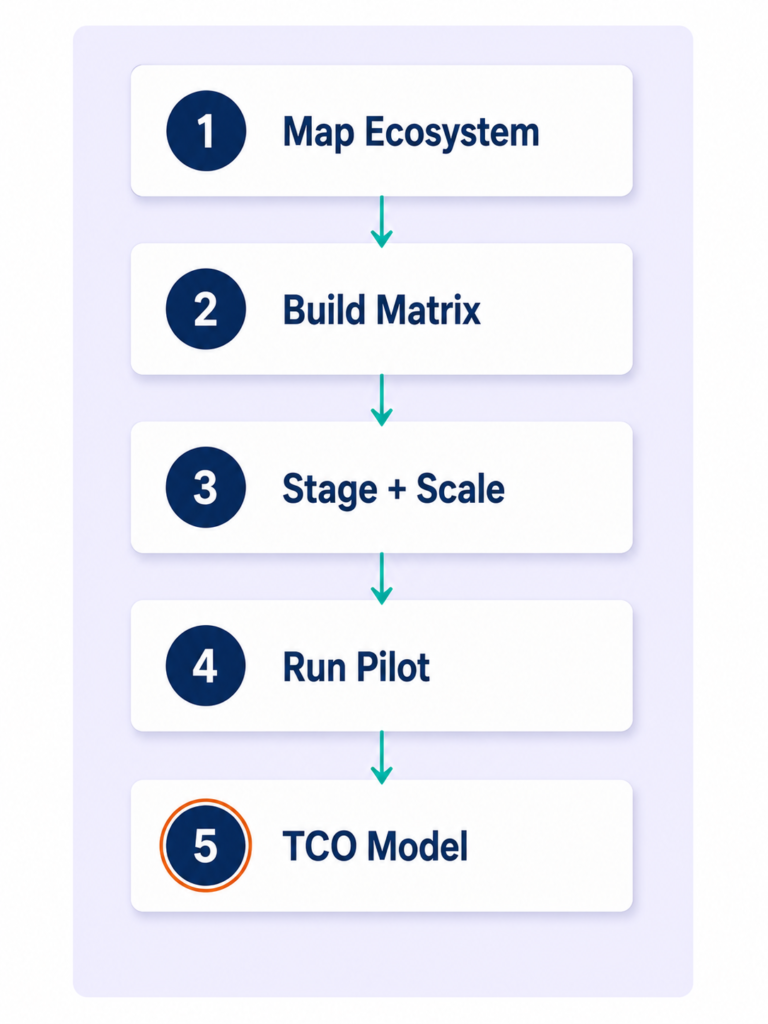
This framework reverses that sequence. You define what success looks like before you watch a single demo. Demos become 30-minute validation exercises, not the thing that drives your decision.
1
Map your training ecosystem before you look at a single demo
Before opening G2, Capterra, or a vendor website, document three things. First, what training currently exists — in what format (PDFs, videos, instructor-led sessions, external courses) and where it lives. Second, which of the four use cases from H2.1 is your primary driver. Third, who the three user types are — the admin (HR), the learner (employee), and the reporter (manager or CHRO) — and what success looks like for each of them.
This mapping exercise typically takes half a day and eliminates two-thirds of the vendor shortlist before you’ve attended a single demo. It is the most valuable step in the process and the one most buyers skip entirely.
- Output 1: A format inventory — what training content exists and where it lives
- Output 2: Your primary use case (compliance, onboarding, skills development, or external)
- Output 3: Three success criteria per user type — admin, learner, and manager/CHRO
The old way
- Search “best training management software,” read 10 listicles
- Add 8 platforms to your demo list
- Let vendor sales pitches define your criteria
The Lab Way
- Spend 4 hours mapping your training ecosystem
- Write 3 success criteria per user type
- Use those criteria as the filter — demos become 30-minute validations, not 60-minute sales pitches
2
Build your must-have vs. nice-to-have feature matrix
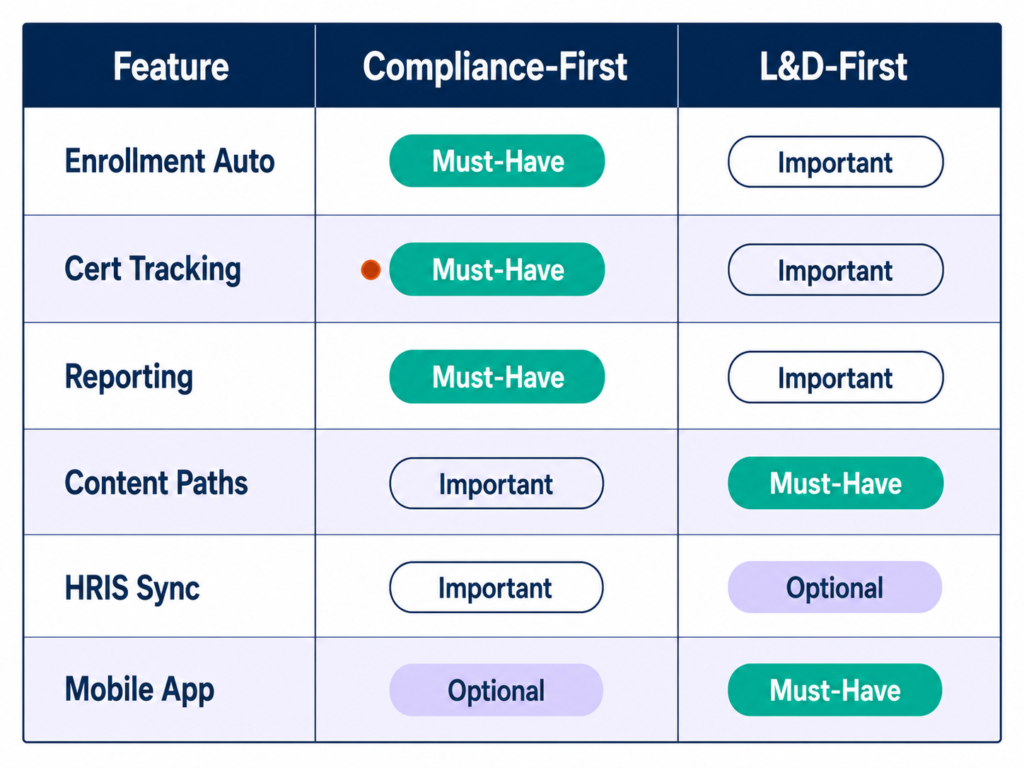
Using the six feature clusters from H2.3 as your framework, sort each feature into one of three tiers: must-have (without this, the platform fails your primary use case), important (adds significant value and would influence the decision), or nice-to-have (useful but not a deal-breaker).
Each organisation’s tier classification will be different depending on which use case is primary. A compliance-first organisation puts certification management and audit reporting in Tier 1. An L&D-first organisation puts learning path builder quality and content library depth in Tier 1. The same feature sits in a completely different tier depending on the organisation.
Once the matrix exists, every vendor is evaluated against Tier 1 items only. If a platform fails two or more Tier 1 requirements, it’s off the shortlist, regardless of how impressive the demo was. Sample matrix for two common scenarios:
| Feature | Compliance-first org | L&D-first org |
|---|---|---|
| Certification tracking & expiry automation | Must-have | Important |
| Real-time compliance dashboard & audit export | Must-have | Nice-to-have |
| Role-based auto-enrollment | Must-have | Must-have |
| Learning path builder with sequencing | Important | Must-have |
| Content authoring or library integration | Nice-to-have | Must-have |
| HRIS integration (bidirectional) | Must-have | Important |
| Manager self-service reporting | Important | Important |
| Mobile app (iOS and Android) | Important | Must-have |
3
Evaluate for your stage and scale
The right platform for a 50-person company is categorically different from the right platform for a 5,000-person enterprise. Three broad tiers:
Small businesses (under 200 employees) need simplicity, quick setup, low admin overhead, and transparent pricing. Platforms with free tiers and same-day go-live potential are the right fit. See “employee training for small business” for a targeted breakdown of options at this scale.
Mid-market organisations (200 to 2,000 employees) need automation, HRIS integration, compliance management, and scalable pricing. Most of the platforms reviewed in the next section are designed for this segment and the lower end of enterprise.
Enterprise organisations (2,000+ employees) need multi-tenant architecture, advanced integrations, custom reporting, dedicated support, and contractual SLAs. Docebo, Absorb LMS, and Cornerstone operate in this tier. The capability is real — so is the implementation complexity and the admin overhead required to operate them.
⚠ WATCH OUT
Common mistake: buying for the company you want to be in three years. The most capable enterprise platform will be actively painful if your HR team has no dedicated LMS admin and your training library currently lives in a shared Google Drive folder. Buy for your current operational reality. Evaluate migration cost and contractual flexibility before signing anything longer than 24 months.
4
Run a real pilot — not a sales demo
A 30-minute demo run by a vendor’s sales engineer is not an evaluation. It is a curated performance. A real pilot gives 15 to 20 actual employees and two HR admins 2 to 4 weeks to use the platform for a real training task.
The same logic applies here as in candidate assessment. You don’t hire based on a 30-minute interview impression. You validate through structured evaluation. The pilot is the assessment.
- Admin setup time: How long does it take to create a course, build an enrollment rule, and configure a compliance report? This is your ongoing admin overhead signal.
- Learner adoption: Do employees complete the assigned training without IT support or HR hand-holding? Friction here predicts your long-term adoption rate.
- Manager experience: Can a manager access their team’s training status without asking HR? If they need help finding it, the interface isn’t manager-friendly enough for operational use.
- Support quality: When something goes wrong during the pilot (and it will), how fast and how useful is the vendor response? Support quality in the pilot predicts support quality in year two.
The old way
- Demo → reference call → sign
The Lab Way
- Demo → structured 2–4 week pilot against the four dimensions above → evaluate against your Tier 1 criteria → reference call with someone who uses it for your primary use case → sign
5
Calculate total cost of ownership — not just the licence fee
The listed licence fee is rarely the actual annual cost. For a 500-person mid-market organisation, total cost of ownership often runs 1.5 to 2.5 times the headline licence fee in year one. Build the full model across all six cost categories before comparing platforms on price.
| Cost category | Typical range (500-person org, year 1) |
|---|---|
| Licence fee (per user/month or flat fee) | $10,000–$25,000/year |
| Implementation and setup | $5,000–$20,000 (often not disclosed upfront) |
| HRIS, SSO, and ATS integration fees | $5,000–$15,000 per integration |
| Content migration from legacy systems | $2,000–$8,000 depending on volume |
| Internal admin time (ongoing) | 0.25–0.5 FTE annually at mid-market |
| Admin and manager training on the system | $1,000–$3,000 one-time |
| Contract exit costs if you switch in year 2 | Varies — read the termination clause |
The old way
- Compare licence fees across shortlisted platforms
- Sign based on the lowest sticker price
- Discover implementation and integration costs post-signature
The Lab Way
- Build a 3-year TCO model for every shortlisted platform using all six categories
- Use conservative figures — the goal is a comparison, not a projection
- Negotiate on total contract value, not headline seat cost
◆ PRO TIP
Real talk: the stated cost is never the actual cost. Earlier in my career, running high-volume hiring across a large enterprise operation, we tracked cost-per-hire before and after moving from agency-reliant sourcing to direct sourcing and internal referrals. Cost per hire dropped by 45 to 55%. The principle is the same for software: the headline price is rarely what you pay, and the full model is always worth building before you commit.
The Real Cost of Running Employee Training without a System
Most budget conversations about training software focus on the cost of the platform. The more important number is the cost of not having one. That cost appears in three places, and most HR leaders are only tracking one of them.
The compliance exposure nobody quantifies until it’s too late
Without a centralised system, compliance tracking defaults to manual spreadsheets. And spreadsheets cannot send automated expiry alerts, flag overdue certifications in real time, or generate audit-ready reports on demand.
In regulated industries — manufacturing, pharmaceuticals, financial services, healthcare — a failed compliance audit caused by incomplete training records can trigger regulatory fines ranging from five to six figures. That’s before legal exposure and remediation costs.
The scenario:
A 500-person manufacturing business runs annual safety re-certifications. Without a TMS, that’s 500 manual entries, 500 individual reminder emails sent by someone who has other work to do, 500 potential gaps, and one compliance audit that becomes a two-week fire drill. With a TMS: automated reminders at 30, 14, and 7 days before expiry; a real-time compliance dashboard; and a one-click audit report. The ROI of the compliance feature alone often exceeds the platform cost in the first regulatory cycle.
59%
of CHROs in Q1 2025 reported that development is one of the elements of the employee experience their organisation struggles with most — up 16 percentage points from 2024.
Source: Gallup Workplace, “Addressing the Barriers Blocking Employee Development,” 2025
If even CHROs — the people directly accountable for development — are struggling to deliver on it, the problem is structural. The structure is the system.
The old way
- Email blast sent before each audit: “Can everyone confirm they’ve completed their safety training?”
- Wait for replies, chase non-responders, compile manually
- Discover three people’s certifications lapsed two months ago
- Spend two weeks preparing the audit report
The Lab Way
- Open the compliance dashboard — real-time, no assembly required
- Filter by team and training type
- See overdue employees flagged in red, at-risk in amber
- Export the audit report in 90 seconds
⚠ WATCH OUT
In regulated industries, a failed compliance audit doesn’t just cost you a fine. It can cost you your operating licence. Frame this as a risk conversation, not a software conversation, when presenting the case internally. See “employee training legal requirements” for a breakdown of jurisdiction-specific obligations. Note: this article does not constitute legal advice. Consult your legal counsel for compliance obligations specific to your jurisdiction and industry.
The Productivity Drain of Manual Training Administration
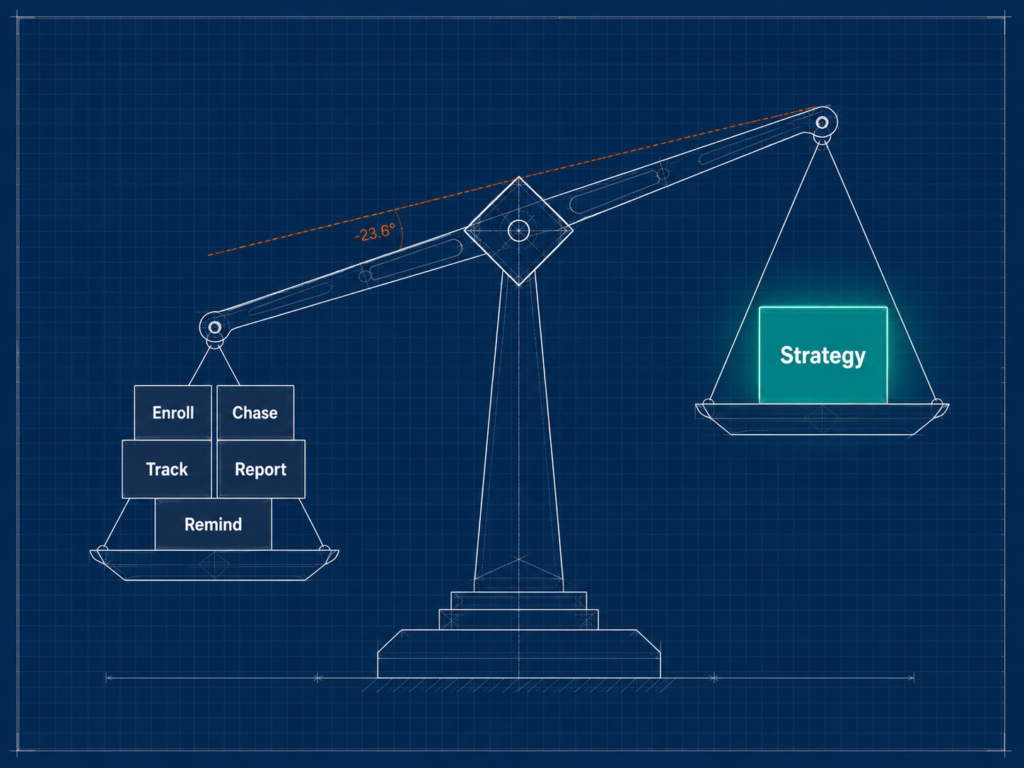
There’s a concept worth naming here: administrative gravity. It’s the weight of low-value operational tasks that pull HR away from strategic work. Manual training management creates a lot of it.
HR professionals managing training manually for a 500-person organisation typically spend 6 to 10 hours per week on enrollment confirmations, completion tracking, reminder escalation, certificate issuance, and report generation for managers. That’s 300 to 500 hours per year of senior HR capacity used as a data-entry function.
A training management system automates all five. Run the maths: if an HR Business Partner’s fully loaded cost is $80,000 per year (roughly $40 per hour), 400 hours of manual admin equals $16,000 in misallocated capacity annually. Most mid-market TMS platforms cost $10,000 to $25,000 per year. The payback calculation works before you count compliance or retention benefits.
The old way
- HR is the training administrator: scheduler, tracker, certificate printer, report producer
- Every manager update requires HR to pull data manually
- Strategic work waits while admin burns the week
The Lab Way
- HR is the training strategist: the system handles operations
- Managers access their team’s status from a self-service dashboard
- HR designs programmes and measures outcomes, not spreadsheets
◆ PRO TIP
Pro tip: Run this calculation before your next budget conversation. Hours your team spends on training admin each week, multiplied by 50 weeks, multiplied by the fully loaded hourly cost of that person — that number is your business case before you mention a single strategic benefit. For context on the training methods a well-configured system should be supporting instead, that’s worth reading alongside this.
The Retention Signal Hidden in your Training Data
Training completion data is not just a compliance metric. It is a leading indicator of employee engagement — and, for organisations willing to look, an early-warning signal for flight risk.
Research consistently shows that employees disengage from development programmes 3 to 6 months before they resign. Organisations with a TMS can run a correlation that teams without one simply cannot: who has stopped engaging with optional learning, who is falling behind on their development path, who has not logged in for 30 or more days. These are signals that a manager conversation might still turn around.
Why this matters beyond compliance:
Training data is dual-purpose. It’s a backwards-looking compliance audit trail and a forwards-looking engagement signal. HR leaders who understand this treat their TMS as a retention intelligence tool, not just a record-keeping system. Without the system, that signal doesn’t exist.
◆ FROM THE LAB
Earlier in my career, managing large-scale hiring across a high-volume enterprise environment, we implemented what we called a “First Look” policy — an internal posting window before any role went external. The part most people focus on is the mobility benefit. The part that changed how we operated was the tracking layer we built around it.
Every internal mover was auto-enrolled in a structured onboarding training track on day one of their new role, with milestone check-ins at 14, 30, and 60 days. We tracked module completion alongside manager feedback at each checkpoint. The data didn’t just tell us who had finished the programme. It told us exactly where in the onboarding sequence people were falling behind — and gave us the window to intervene before someone was 90 days in and already disengaged.
The result: internal movers who went through the structured, system-tracked onboarding reached full productivity in 28 days on average. External hires who came in without a structured onboarding track took 67 days. That’s a 39-day difference per hire. At any reasonable daily output value, that gap has a dollar figure attached to it — and it becomes the business case for systematic tracking without needing to cite a single external benchmark.
The tracking system didn’t just prove the programme worked. It gave us the ability to identify, in real time, who was at risk of falling behind before the damage was done.
⚠ WATCH OUT
Common mistake: using training data exclusively for the compliance audit and ignoring the engagement signal entirely. If you’re checking training completion data once a quarter, you’re using it as a rear-view mirror. A weekly review of training engagement by team — who’s engaged, who’s drifting — is where the retention value lives. See “employee training best practices” for how to build this into your HR operating rhythm.
How to Track Employee Training Effectively
Most organisations track training completion. Very few track whether training is actually working. These are different questions, and the second one is the only one that generates a CFO-credible answer when budget renewal comes around.
What you should actually be tracking (beyond completion rates)
Employee training is tracked through a training management system that records enrollment, completion, assessment scores, and certification status for each employee. But effective tracking goes beyond completion rate as the primary metric. A 95% completion rate on a mandatory course where 60% of learners scored below 70% on the assessment is not a training success. It’s a compliance fig leaf.
The six metrics that tell you whether training is working:
- Assessment scores and retake rates. Are employees passing assessments on the first attempt, or gaming the system? High retake rates on a specific module signal a content problem, not a learner problem.
- Time-to-completion. Are employees finishing training on schedule, or at the last minute before a deadline? Last-minute completion clusters before an audit suggest the training is being treated as a checkbox, not a priority.
- Training engagement rate. Are employees completing optional development courses, or only touching mandatory training? Optional learning engagement is your leading indicator of development culture.
- Certification expiry rate. What percentage of certifications are lapsing before renewal? A rising expiry rate is a compliance risk signal, not just an administrative nuisance.
- Training-to-performance correlation. Is there a measurable relationship between training completion and performance ratings in the next review cycle? This requires HRIS integration — which is why integration capability is a Tier 1 requirement, not a nice-to-have.
- Cohort comparison. Do teams with higher training engagement show lower turnover rates? This is the retention signal, and it’s only visible if you’re tracking both signals in the same system or connecting them through your HR operating framework.
⚠ WATCH OUT
A 100% completion rate with 60% of learners scoring below 70% on the assessment is not a training success. It means the mandatory completion threshold is too low and the content isn’t being absorbed. This is one of the most common patterns in compliance-first training programmes — and it’s only visible if you’re tracking assessment scores alongside completion.
How to Build a Training Compliance Dashboard
A training compliance dashboard answers one question in under 10 seconds: “Are we compliant right now, by team, by training type, and by individual — and who is at risk of lapsing?” If your current system requires more than a minute to answer that question, you don’t have a compliance dashboard. You have a report.
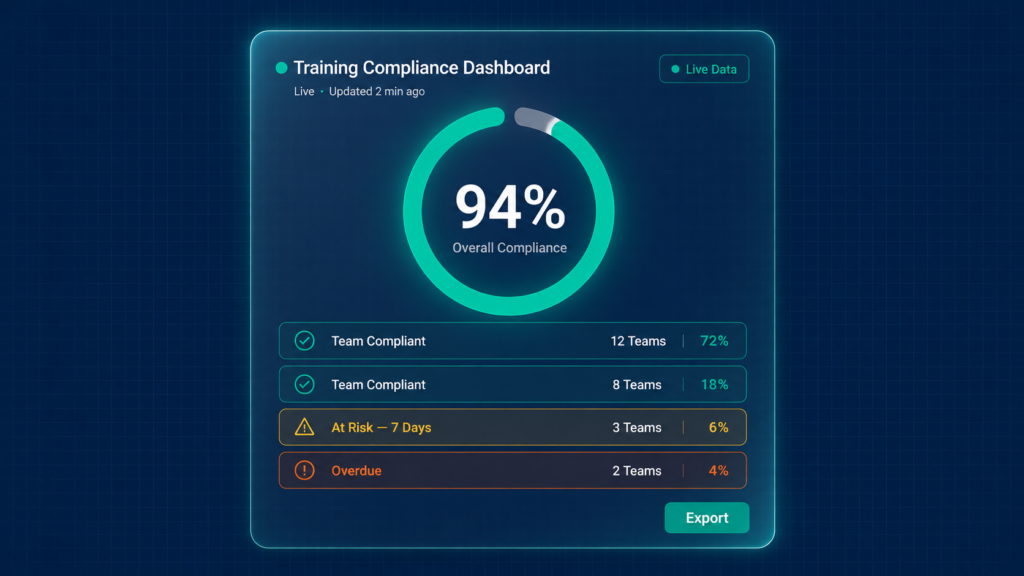
The five elements a compliance dashboard must contain:
1
Real-time compliance rate by department and team
Not a report generated overnight. A live number that reflects completions as they happen. If a certification was recorded at 3pm, the dashboard shows it by 3pm.
2
Overdue and at-risk employee flags
Overdue employees visible in red. Employees within 14 days of a lapse in amber. Employees within 30 days in yellow. The colour coding matters — it tells the manager what action is needed without requiring them to interpret a table.
3
Upcoming certification expirations for the next 60 and 90 days
Forward-looking visibility, not just backwards-looking completion records. See your compliance obligations to understand which certification windows are non-negotiable in your jurisdiction and industry.
4
Manager-level self-service view
Each manager sees their own team’s status without asking HR. HR sets the access permissions once. After that, the data flows directly to the people responsible for acting on it.
5
One-click audit report export
CSV and PDF, dated and immutable. The report a regulator asks for should take 90 seconds to produce, not two days. If the answer is “we can generate that — it just takes a bit of time to compile,” the platform is not configured for compliance-grade use.
◆ PRO TIP
Pro tip: Test your compliance dashboard in every vendor demo by asking the sales engineer to walk through all five elements above. Platforms that cannot demonstrate three or more of these natively are not compliance-grade systems, regardless of what the sales deck claims.
The Training Data your Managers Actually Need
One of the most common failures in TMS implementation is this: all the data goes to HR, and managers remain completely blind to their team’s training status. Then HR spends its week fielding “can you tell me where my team is on their compliance training?” emails.
Managers need exactly three data points in a self-service view. Nothing more. Nothing less.
- Completion status for all active mandatory training: who is done, who is overdue, who is approaching a deadline. One view, no HR involvement required to access it.
- Certification expiry schedule for the next 90 days: which team members have certifications lapsing soon, and how soon. This is the proactive version of the compliance dashboard — it prompts manager conversations before the red flag appears.
- Optional learning engagement: which team members are investing in development beyond mandatory training. This is the engagement and retention signal — the data that turns a training system into a retention intelligence tool.
◆ PRO TIP
Pro tip: During the platform pilot, ask three managers to navigate to their team’s training status without any guidance. If they need help finding it, the interface is not manager-friendly enough for daily operational use. The manager experience determines whether the compliance dashboard actually drives manager action — or whether HR ends up running the dashboard for everyone anyway.
Implementation — The Change Management Layer Nobody tells you about
“Only 36% of organisations have learning programmes that yield measurable business results. Most invest in training software and still end up in the 64%. The reason is almost never the platform. It’s what happens — or doesn’t happen — around the platform.”
Source: LinkedIn Learning 2025 Workplace Learning Report
Zero competitors cover implementation in any depth. They review features and pricing, then stop. But implementation failure — specifically the change management layer that most platform rollouts skip entirely — is the primary cause of low TMS adoption post-purchase. This section covers what the 36% do differently.
Pre-launch — The Stakeholder Buy-in Checklist
The single biggest predictor of TMS adoption is manager buy-in at go-live. Not platform quality. Not training content quality. Manager buy-in. If managers see the system as HR’s compliance tool being imposed on their team, adoption will plateau at 40 to 60% and stay there.
- Brief every manager two weeks before launch. Not an email. A 20-minute conversation explaining why the system matters for their team’s performance and exactly how to use their manager dashboard. The goal is advocacy, not awareness.
- Identify 3 to 5 internal champions per department. Employees who test the platform early and become peer advocates. They handle the “how do I log in?” questions so HR doesn’t have to.
- Communicate “what’s in it for me” to employees directly. Training on this platform benefits their career progression, not just HR’s compliance audit. If employees believe the system exists for the organisation’s benefit only, they will treat it that way.
- Confirm SSO is deployed before go-live. A separate login screen on day one kills adoption. This is a technical item that HR needs to own in partnership with IT — do not discover it’s missing on launch day.
- Verify HRIS sync is running clean. Ghost accounts and missing employees on day one are an immediate credibility problem that managers notice and remember.
⚠ WATCH OUT
Launching without SSO configured is the most common go-live mistake. Learners who hit a separate login screen on day one will not return. The friction is small. The adoption impact is not.
The First 90 days — making adoption stick
The first 90 days determine whether the platform becomes embedded in how the organisation operates, or becomes another system that HR uses and everyone else ignores. Phase the rollout deliberately — one win per 30-day window.
1
Days 1–30: drive one training track to 90%+ completion
Pick the most critical training track (safety, onboarding, or a mandatory compliance module) and drive it to 90% completion before moving on. Early wins build momentum and establish the platform as operational infrastructure, not an experiment. Don’t flood employees with everything at once.
2
Days 31–60: activate manager dashboards
Run a 30-minute manager briefing — in person or virtual — on how to read their team’s training status and what action each flag requires. Not a training on the platform. A briefing on what the three data points mean and what to do with them. This is the step that shifts the compliance conversation from HR’s responsibility to a shared operational responsibility.
3
Days 61–90: introduce optional development tracks
Open the platform to optional development learning for early adopters. Seed the learning culture before making it mandatory. At week 12, run a 3-question employee pulse: “Did it load easily? Was the content relevant? What would you improve?” Use the feedback to make one visible change. This signals that the platform is responsive — and makes the next training launch feel less imposed.
◆ PRO TIP
Real talk: 90-day adoption under 60% is a signal worth investigating before it becomes a 12-month problem. It’s almost always one of two things — a content relevance problem (employees don’t believe the training is useful to them) or an access friction problem (login, mobile, or manager mandate). Check both before assuming the platform is the issue.
Post-launch — Measuring whether it’s working
After 90 days, shift from adoption metrics to outcomes metrics. The four signals that tell you whether the platform is delivering:
- Completion rate trend. Is it rising month-over-month or plateauing? Plateau under 75% requires investigation. A static number is a signal that adoption has stopped growing — which means the programme has stopped reaching new employees or re-engaging lapsed ones.
- Manager engagement. Are managers actively checking their dashboards, or is HR still fielding “what is my team’s training status?” by email? If it’s the latter, the manager briefing from days 31 to 60 needs to be repeated.
- Training-to-hire quality correlation. For onboarding training specifically: is there a measurable relationship between onboarding programme completion and 90-day performance ratings? This is where the retention signal becomes a performance signal.
- Compliance audit readiness. How long does it take to produce the compliance report your legal or operations team needs? If the answer is still “a few days,” the platform is not configured for compliance-grade use regardless of what it’s capable of.
◆ PRO TIP
Pro tip: The 6-month mark is the right time to run the correlation analysis between training engagement and performance data. 90 days is too early — the signal is too weak. 12 months is too late for the budget renewal conversation. Six months gives you enough data to make a defensible case with enough time to present it before renewal discussions begin.
Measuring Training ROI Beyond Completion rates
Most HR leaders walk into the budget conversation with training completion data. Most CFOs walk out unmoved. The problem isn’t that HR can’t prove ROI — it’s that HR is speaking in the wrong language.
The four training ROI metrics your CFO will actually respond to
CFOs respond to four types of financial measurement. Every other metric is noise in that conversation.
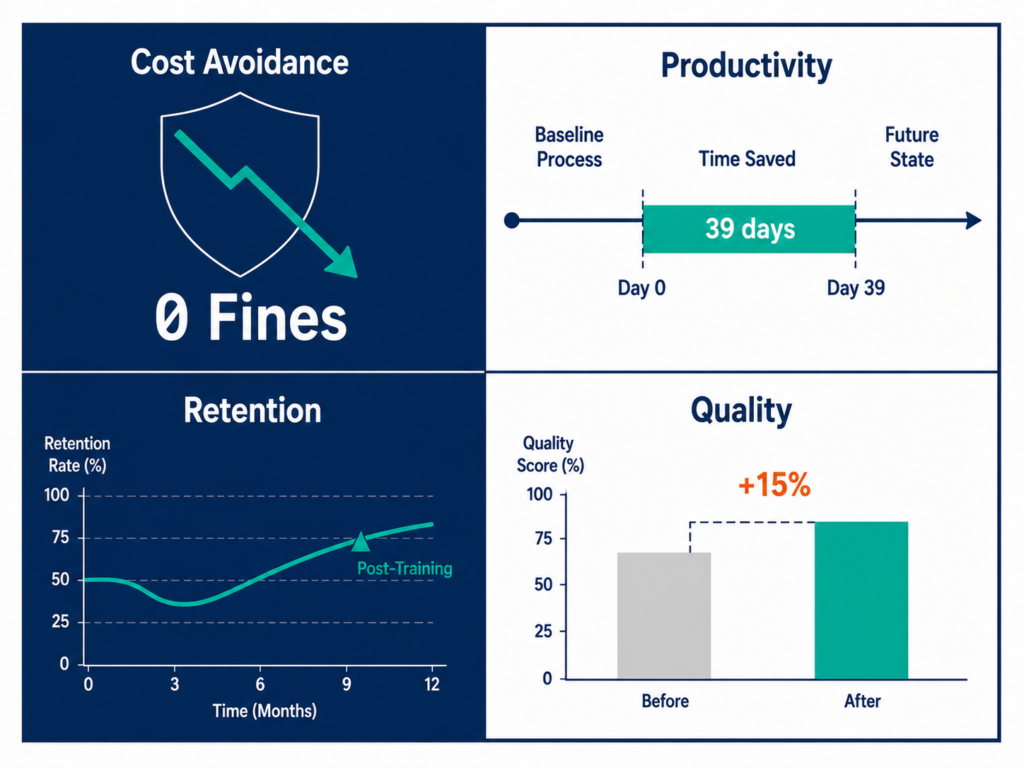
- Cost avoidance. “Our TMS flagged 14 overdue certifications before the Q3 compliance audit. Remediation cost: zero. Potential regulatory exposure if missed: $40,000 to $120,000 depending on jurisdiction. The platform paid for itself in that quarter.” This is the language a compliance-driven CFO responds to immediately.
- Productivity gain. “Time-to-Productivity for new hires decreased by 39 days after implementing structured onboarding training with milestone tracking. At an average daily output value of $X for the role, that’s $Y in accelerated productivity per hire — multiplied across every cohort.” Build this calculation with your own numbers. It’s more compelling than any industry benchmark.
- Retention impact. “Teams with above-80% optional training engagement have measurably lower turnover than teams below 50% engagement. At $X average cost-to-replace for this role level, each retained employee in the high-engagement cohort represents $Y in avoided recruitment and ramp costs.”
- Quality improvement. “Employees who completed the full onboarding training track received 15% higher 90-day performance ratings than those who skipped modules. This correlation now informs our onboarding programme design — which modules are mandatory versus optional, and where we’re adding content.”
Each of these metrics requires three things: a TMS that tracks the right data, an HRIS integration that connects training data to performance and retention data, and a baseline measurement taken before the platform goes live. Start measuring the baseline before go-live. Without a pre-TMS baseline, the post-TMS data has nothing to compare against.
◆ FROM THE LAB
The productivity gain metric is the one I’d build first, because the data to support it often already exists. Earlier in my career, when we moved to systematic tracking of our internal onboarding programme, the numbers were clear: internal movers going through the structured, system-tracked programme reached full productivity in 28 days. External hires without the structured track took 67 days. That’s a 39-day difference per hire.
The same principle applies to everything we tracked in our hiring function. After implementing competition analysis as a standard sourcing input, Quality of Hire improved by 12%. After adding talent landscape research across similar industries, it improved by a further 14%. After building a skills-based talent pipeline informed by market analysis, it improved by 30% on top of that. None of those improvements happened because we worked harder. They happened because we started measuring the right inputs and acting on the data we could finally see.
Training ROI works exactly the same way. The organisations that can prove it are the ones that tracked the baseline before the platform went live, connected the training data to the performance and retention data that already existed, and built the before-and-after story over 6 to 12 months. The data is there. The platform makes it visible.
Building the CFO Business Case — A Template
The most effective training software business cases use conservative numbers. A CFO who approves a conservative case and sees upside in year one becomes a budget advocate for the renewal. A CFO who approves an optimistic case and sees a shortfall becomes the barrier. Build for credibility, not for approval.
Five-section structure that works in any finance conversation:
- Section 1 — The problem we’re solving. Quantify the current cost of manual training management (admin hours × hourly rate) and the compliance exposure (regulatory context + worst-case fine estimate for your jurisdiction and industry). This is the cost of the status quo. Put a number on it.
- Section 2 — The solution. Describe the platform and its primary capabilities — one paragraph. Avoid feature lists. Focus on the operational outcome: “This platform replaces manual training administration with automated scheduling, real-time compliance tracking, and manager self-service reporting.”
- Section 3 — The cost. Full 3-year TCO using all six categories from H2.4 Step 5. This is where you demonstrate that you’ve done the actual maths, not just the licence comparison.
- Section 4 — The return. The four-metric ROI model above, with conservative, mid-range, and optimistic scenarios. Show the calculation clearly. The CFO should be able to follow the maths without asking for clarification.
- Section 5 — The risk of not acting. What happens if the status quo continues? Continued admin drain (quantified), growing compliance risk (quantified), worsening retention as development stagnates. The risk of inaction is part of the business case. Don’t leave it out.
◆ PRO TIP
Pro tip: Use conservative numbers in section 4. Always. A CFO who approves a conservative case and sees upside is a budget advocate. A CFO who approves an optimistic case and sees a shortfall becomes the renewal barrier. Present the conservative scenario as your base case, and let the upside speak for itself when it materialises.
Frequently asked questions
What is employee training management software?
Employee training management software is a platform that centralises the operational lifecycle of employee learning — from scheduling and enrollment through completion tracking, certification management, compliance reporting, and analytics. It answers the question every HR leader needs answered in real time: who has completed what, who is overdue, and is the organisation audit-ready right now.
The category is also referred to as a Training Management System (TMS). It is distinct from a Learning Management System (LMS), which focuses on content delivery and the learner experience. Many modern platforms blend both capabilities, but the distinction matters when evaluating: know which function is primary before booking a single demo. Organisations that skip this step are the ones who sign 3-year contracts and spend 18 months wishing they’d asked different questions.
Primary use cases include compliance and mandatory training, onboarding and new hire development, skills development and learning paths, and external training for partners or customers. Each use case has a different primary feature requirement — see H2.1 for the full breakdown.
What is the difference between an LMS and training management software?
An LMS manages content delivery and the learner experience. Training management software manages training operations. The LMS answers “what are employees learning?” The TMS answers “who completed what, when, are they compliant, and who is overdue?”
| LMS capability | TMS capability |
|---|---|
| Course creation and content hosting | Enrollment automation and scheduling |
| Learner progress tracking | Certification expiry alerts and auto-escalation |
| Assessment and quiz delivery | Real-time compliance dashboard |
| Learning path experience | Audit-ready report export |
| Social and collaborative learning features | Manager self-service reporting |
Many platforms blend both — but knowing which capability you need most determines which platform is right for you. An organisation whose primary need is compliance tracking in a regulated environment should evaluate TMS-first platforms. An organisation whose primary need is rich learning experiences and content creation should evaluate LMS-first platforms. For a breakdown of what each looks like in an employee training platform evaluation, that’s worth reading alongside this guide.
How do you track employee training?
Employee training is tracked through a training management system that records enrollment, completion, assessment scores, and certification status for each employee in real time. Effective tracking goes well beyond the completion rate as the primary signal.
The six metrics that actually tell you whether training is working: assessment scores and retake rates, time-to-completion patterns, optional learning engagement rate, certification expiry rate, training-to-performance correlation, and cohort comparison of training engagement versus turnover. Each metric surfaces something the completion rate cannot. The training-to-performance correlation and the cohort comparison both require HRIS integration to run — which is why that integration is a Tier 1 feature requirement for any organisation using training data as a business lever, not just a compliance record. See the tracking framework for how to build this into your monthly HR operating rhythm.
How much does employee training management software cost?
Employee training management software ranges from free (TalentLMS free tier, up to 5 users) to $100,000 or more per year for enterprise deployments. Mid-market platforms typically cost $10,000 to $30,000 per year for 200 to 1,000 employees.
Reference pricing for the five platforms reviewed above (verify directly with each vendor at time of evaluation — pricing changes): TalentLMS starts at free, with paid tiers from $109/month (100 users) to $399/month (1,000 users); 360Learning’s Team plan is $8/user/month publicly listed; Docebo, Absorb LMS, and LearnUpon all use custom pricing, with typical mid-market contracts ranging from $15,000 to $80,000 per year depending on user count, features, and implementation scope.
Always calculate total cost of ownership. Implementation, HRIS integration fees, content migration, and ongoing admin overhead typically add 50 to 150% to the headline licence fee in year one. The 3-year TCO model from H2.4 Step 5 gives you the framework to build a comparison that reflects actual cost rather than the number on the pricing page.
What features should I look for in training management software?
The six features that separate effective training management software from expensive noise are: training scheduling and enrollment automation, compliance and certification tracking, reporting and analytics, content management and learning paths, HRIS integrations, and mobile access and learner experience.
The relative priority of each feature depends entirely on your primary use case. Compliance-first organisations rank certification tracking and audit reporting highest — these are Tier 1. L&D-focused organisations rank learning path quality and content library depth highest. The feature matrix from H2.4 Step 2 gives you a practical tool for sorting your own requirements before evaluating any vendor. The evaluation question that applies to every feature on this list: not “does the platform have it?” but “does the demo show me what a bad implementation of it looks like?” The difference between a genuine compliance dashboard and a checkbox field labelled “completed: yes/no” is enormous — and it only shows up when you ask the right questions.
- Training scheduling and enrollment automation
- Compliance and certification tracking
- Reporting and analytics
- Content management and learning paths
- HRIS integrations
- Mobile access and learner experience
The organisations in the top 36% — those whose training programmes actually yield measurable business results — are not using more features. They’re using the right features, configured correctly, with a change management layer that makes adoption stick.
The organisations that get the most from employee training management software are not the ones who found the best platform. They are the ones who mapped what they needed to measure before they signed anything.
The gap between training intent and training outcomes is almost always a systems gap. The right system, properly implemented, closes it — and makes the ROI case for the next budget cycle write itself. The hard part isn’t finding a platform. It’s going into the evaluation with a filter no vendor can sell past: your own success criteria, mapped to your own operational reality, before you watch a single demo.
The next step is not choosing a platform. It’s mapping your training ecosystem, writing your three success criteria per user type, and walking into your first vendor conversation knowing exactly what a pass looks like — and exactly what a fail looks like. That’s what separates a purchase you’ll defend at renewal from one you’ll regret at month 18.
If you’re in the middle of an evaluation and want a practitioner’s perspective on a specific platform or use case, connect with Sofia on LinkedIn. The conversation is peer-to-peer, not consultative. And if you want the next framework — including how to build the correlation analysis between training engagement and retention data — the Lab Note newsletter delivers it directly. Subscribe at the top of this page.
